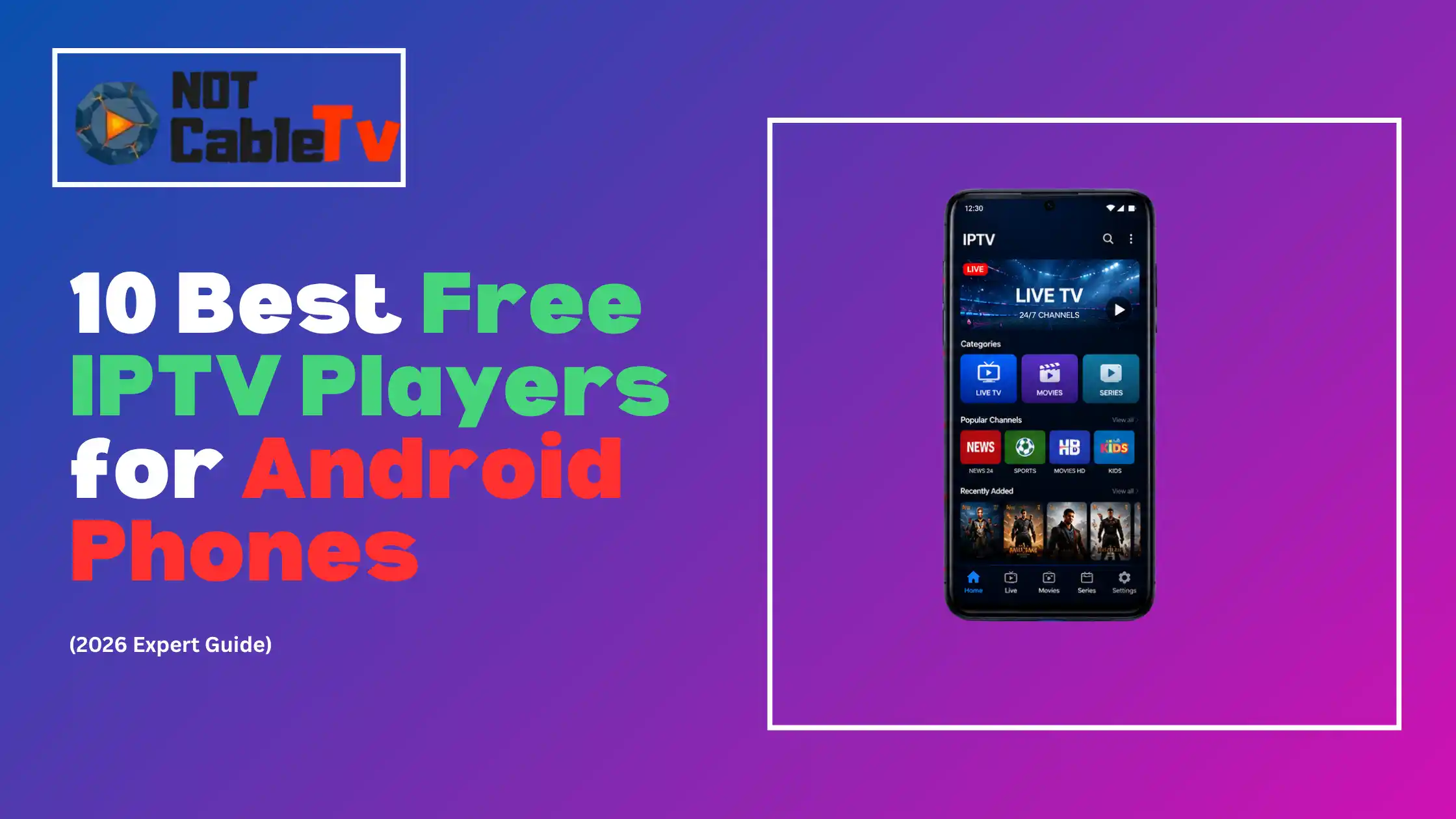
Finding the best free IPTV player for your Android phone can be surprisingly difficult. A quick search on the Google Play Store reveals dozens of IPTV apps, each claiming to offer the best streaming experience. However, not all IPTV players provide the same level of performance, compatibility, or ease of use.
Some apps are designed for beginners who simply want to load an M3U playlist and start watching live TV. Others include advanced features such as Xtream Codes API support, Electronic Program Guide (EPG), Video on Demand (VOD), multi-playlist management, Chromecast support, external media players, catch-up TV, recording capabilities, and 4K playback.
Choosing the right IPTV player is important because it directly affects your viewing experience. A well-designed app can deliver fast channel switching, smooth HD streaming, organized TV guides, and an intuitive interface. On the other hand, a poorly optimized player may suffer from buffering, slow navigation, missing EPG data, or limited playlist compatibility.
In this expert guide, we’ve carefully compared the best free IPTV players available for Android phones based on usability, supported features, customization options, playback quality, and overall user experience. Whether you’re looking for the best IPTV player for live sports, movies, TV shows, or everyday streaming, you’ll find an option that matches your needs.
Quick Answer
If you’re looking for the best free IPTV player for Android, IPTV Smarters Pro, TiviMate, OTT Navigator, Televizo, and XCIPTV Player are among the top choices. These apps support popular playlist formats like M3U and Xtream Codes, offer Electronic Program Guide (EPG) support, and provide a smooth streaming experience on most Android smartphones.
In the sections below, we’ll compare their features, strengths, limitations, and help you choose the best IPTV player for your Android device in 2026.

Watch Every Match Smoothly
What Is an IPTV Player?
An IPTV player is a media application that allows you to stream television channels, movies, TV series, and other video content using an IPTV playlist or IPTV account. Unlike traditional TV apps, an IPTV player does not include channels or subscriptions. Instead, it acts as the software that organizes and plays the content provided by your IPTV service.
Think of it like this:
- Netflix includes both the app and the content.
- An IPTV player only provides the app.
- An IPTV service supplies the playlists, live TV channels, movies, and series.
Once you add your IPTV credentials—such as an M3U playlist URL, Xtream Codes API, or another supported format—the player loads your content into a user-friendly interface, making it easy to browse channels, watch live TV, and access on-demand content.
IPTV Player vs. IPTV Service
One of the biggest misconceptions among new users is confusing an IPTV player with an IPTV provider. They work together, but they serve different purposes.
| Feature | IPTV Player | IPTV Service |
|---|---|---|
| Includes TV channels | ✕ No | ✓ Yes |
| Plays live TV | ✓ Yes | ✓ Yes |
| Requires a subscription | ✕ Usually free | ✓ Usually required |
| Supports M3U playlists | ✓ Yes | Provides the playlist |
| Supports Xtream Codes | ✓ Yes | Provides login credentials |
| Organizes channels and EPG | ✓ Yes | Supplies the data |
| Includes movies and series | ✕ Only if provided | ✓ Yes |
In simple terms, the IPTV player is the software, while the IPTV service is the content provider.
How IPTV Players Work
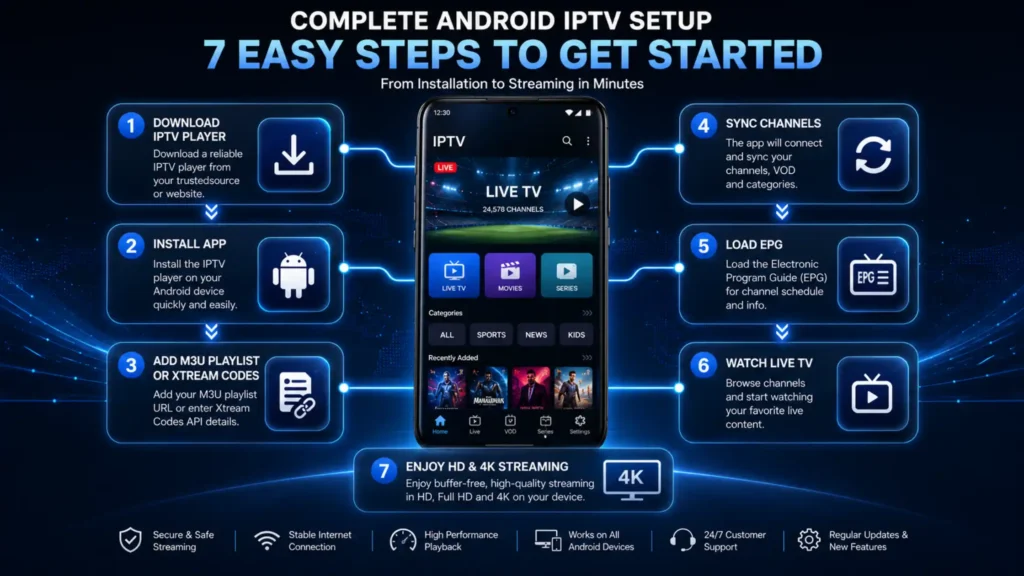
Most IPTV players follow the same basic process:
- Install the IPTV player on your Android phone.
- Open the app.
- Add your IPTV playlist using one of the supported methods:
- M3U URL
- Xtream Codes API
- Local M3U file
- Wait for the app to import your channels, Electronic Program Guide (EPG), movies, and TV series.
- Start watching your content.
Many modern IPTV players automatically organize your library into categories such as:
- Live TV
- Sports
- Movies
- TV Shows
- Kids
- News
- Favorites
- Recently Watched
This makes navigation much easier, especially when your IPTV service includes thousands of channels and a large video-on-demand library.
Common Playlist Formats Supported
The best Android IPTV players support several playlist formats, giving users flexibility regardless of which IPTV service they use.
| Playlist Type | Purpose |
|---|---|
| M3U Playlist | The most widely used playlist format for streaming live TV channels. |
| Xtream Codes API | Automatically imports live channels, VOD, TV series, and EPG using a server URL, username, and password. |
| M3U8 Streams | Direct streaming links designed for individual live TV channels. |
| EPG URL (XMLTV) | Displays the electronic TV guide with channel schedules, program names, and upcoming broadcasts. |
Support for both M3U playlists and Xtream Codes is one of the most important features to look for when choosing an IPTV player.
Why Android Is One of the Best Platforms for IPTV
Android smartphones are popular for IPTV because they combine flexibility, performance, and a huge selection of compatible apps.
Some of the biggest advantages include:
- Access to dozens of free IPTV players.
- Easy installation through the Google Play Store.
- Support for M3U playlists and Xtream Codes.
- Chromecast compatibility on many devices.
- HD, Full HD, and 4K playback support on capable hardware.
- Integration with external video players like VLC and MX Player.
- Frequent updates from developers.
- Compatibility with phones, tablets, foldables, and many Android-based devices.
Whether you own a Samsung Galaxy, Google Pixel, Xiaomi, OnePlus, Motorola, Oppo, Vivo, or another Android smartphone, you’ll find multiple IPTV players that work smoothly on your device.
What an IPTV Player Does Not Do
It’s equally important to understand what an IPTV player doesn’t do.
A player does not:
- Include free TV channels.
- Provide an IPTV subscription.
- Unlock premium sports or movie channels by itself.
- Guarantee streaming quality.
- Control the reliability of your IPTV service.
The quality of your viewing experience depends on three main factors:
- The IPTV player you choose.
- The IPTV service you use.
- Your internet connection and Android device.
Choosing a reliable combination of all three will give you the best overall streaming experience.
Quick Comparison: The Best Free IPTV Players for Android Phones
If you’re short on time, here’s a quick comparison of the best free IPTV players for Android. Each app excels in different areas, whether you prioritize a modern interface, advanced customization, sports streaming, or support for multiple playlist formats.
| IPTV Player | Best For | M3U | Xtream Codes | EPG | VOD | Chromecast | Android TV | Free Version | Overall Rating |
|---|---|---|---|---|---|---|---|---|---|
| IPTV Smarters Pro | Overall Best | ✔ | ✔ | ✔ | ✔ | ✔ | ✔ | ✔ | ⭐⭐⭐⭐⭐ (9.9/10) |
| TiviMate | Premium Experience | ✔ | ✔ | ✔ | ✔ | Limited | ✔ | ✔ | ⭐⭐⭐⭐⭐ (9.8/10) |
| OTT Navigator IPTV | Advanced Users | ✔ | ✔ | ✔ | ✔ | ✔ | ✔ | ✔ | ⭐⭐⭐⭐⭐ (9.7/10) |
| Televizo | Beginners | ✔ | ✔ | ✔ | ✔ | ✖ | ✔ | ✔ | ⭐⭐⭐⭐☆ (9.5/10) |
| XCIPTV Player | Live Sports | ✔ | ✔ | ✔ | ✔ | Limited | ✔ | ✔ | ⭐⭐⭐⭐☆ (9.4/10) |
| Sparkle TV | Android TV | ✔ | ✔ | ✔ | ✔ | Limited | ✔ | ✔ | ⭐⭐⭐⭐☆ (9.3/10) |
| Perfect Player IPTV | Older Android Devices | ✔ | Partial | ✔ | Limited | ✖ | ✔ | ✔ | ⭐⭐⭐⭐☆ (9.1/10) |
| Kodi | Maximum Customization | ✔ | Plugin | ✔ | ✔ | ✔ | ✔ | ✔ | ⭐⭐⭐⭐☆ (9.0/10) |
| VLC Media Player | Simple M3U Playback | ✔ | ✖ | ✖ | ✖ | ✔ | ✔ | ✔ | ⭐⭐⭐⭐☆ (8.8/10) |
| NexTV IPTV | Clean Interface | ✔ | ✔ | ✔ | ✔ | Limited | ✔ | ✔ | ⭐⭐⭐⭐☆ (8.7/10) |
Our Top Recommendations
After comparing features, ease of use, compatibility, and overall performance, these are our top picks for different types of Android users.
🏆 Best Overall IPTV Player

IPTV Smarters Pro
IPTV Smarters Pro remains one of the most complete IPTV players available. It combines a polished interface with excellent compatibility, making it suitable for both beginners and experienced users. Support for M3U playlists, Xtream Codes, EPG, catch-up TV, and Video on Demand makes it an excellent all-around choice.
Ideal for:
- First-time IPTV users
- Families
- Everyday streaming
- Movies and TV shows
- Live sports
⚡ Best Premium Experience

TiviMate
TiviMate offers one of the most polished interfaces in the IPTV market. Navigation is fast, channel organization is excellent, and the Electronic Program Guide feels similar to a traditional cable TV experience.
It’s particularly popular among users with large IPTV playlists who value speed and customization.
Ideal for:
- Power users
- Large channel lists
- Advanced customization
- Frequent IPTV viewers
🔧 Best for Advanced Users
OTT Navigator IPTV
OTT Navigator is packed with advanced features, including extensive filtering options, playlist management tools, and interface customization. While it has a steeper learning curve than other apps, it rewards experienced users with exceptional flexibility.
Ideal for:
- Multiple IPTV subscriptions
- Custom channel organization
- Advanced filtering
- Personalized layouts
👶 Best for Beginners

Televizo
If you’re new to IPTV, Televizo offers one of the simplest setup processes. Its clean interface and intuitive navigation make it easy to add playlists and start watching without spending time learning complicated settings.
Ideal for:
- Beginners
- Casual viewers
- Users who prefer simplicity
⚽ Best for Live Sports

XCIPTV Player
XCIPTV Player is a favorite among sports fans thanks to its responsive interface, smooth channel switching, and excellent compatibility with live IPTV services. It also works well with Video on Demand libraries and Electronic Program Guides.
Ideal for:
- Football fans
- Live sports
- Fast channel switching
- Daily streaming
Which IPTV Player Should You Choose?
If you’re still undecided, this quick guide can help.
| Your Priority | Recommended IPTV Player |
|---|---|
| Best overall experience | IPTV Smarters Pro |
| Most modern interface | TiviMate |
| Maximum customization | OTT Navigator IPTV |
| Easiest setup | Televizo |
| Live sports streaming | XCIPTV Player |
| Older Android phones | Perfect Player IPTV |
| Open-source flexibility | Kodi |
| Lightweight media playback | VLC Media Player |
No single IPTV player is perfect for everyone. The best choice depends on how you use IPTV, the features you need, and the type of playlists your IPTV provider supports.
In the next section, we’ll explain how we evaluated each IPTV player, including compatibility, interface design, playback quality, customization options, playlist support, and overall user experience before reviewing each app individually.
Watch Every Match Smoothly
1. IPTV Smarters Pro – Best Overall Free IPTV Player for Android
Overall Rating: ⭐⭐⭐⭐⭐ 9.9/10
Best For: Beginners, families, sports fans, and everyday IPTV users.
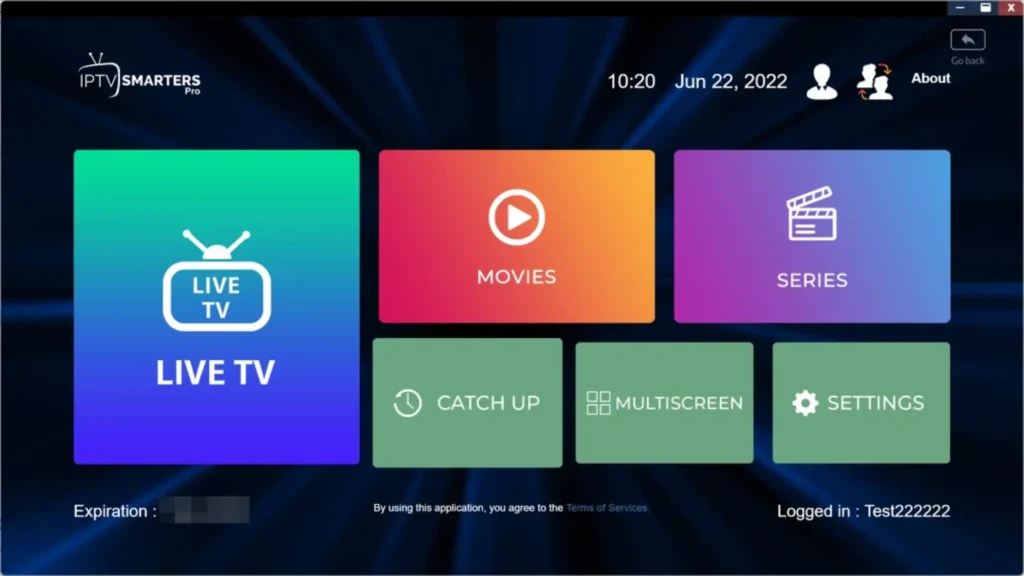
If you’re looking for the best free IPTV player for Android phones, IPTV Smarters Pro is one of the strongest choices available. It combines an intuitive interface with excellent compatibility, making it suitable for both first-time IPTV users and experienced streamers.
Unlike many IPTV players that require extensive configuration, IPTV Smarters Pro allows you to import your IPTV subscription in just a few steps using Xtream Codes API, M3U playlists, or local playlist files. Once connected, the app automatically organizes your content into categories such as Live TV, Movies, Series, and Catch-Up (if supported by your IPTV provider).
Its modern interface is easy to navigate on smartphones and tablets, while features like Electronic Program Guide (EPG), favorites, search, parental controls, and external player support make it a complete solution for everyday streaming.
Key Features
- ✅ M3U Playlist support
- ✅ Xtream Codes API login
- ✅ Electronic Program Guide (EPG)
- ✅ Video on Demand (VOD)
- ✅ TV Series library
- ✅ Catch-Up TV (provider dependent)
- ✅ Multi-screen support (supported devices)
- ✅ External player compatibility
- ✅ Favorites and recently watched
- ✅ Built-in search function
- ✅ HD, Full HD, and 4K playback support
- ✅ Parental controls
- ✅ User-friendly interface
Why We Recommend IPTV Smarters Pro
One of IPTV Smarters Pro’s biggest strengths is its balance between simplicity and functionality.
New users can add an IPTV account within minutes, while advanced users still benefit from features like playlist management, multiple login methods, and support for external video players.
The app also works well with most IPTV services that provide:
- M3U Playlist URLs
- Xtream Codes credentials
- XMLTV EPG links
Because of its broad compatibility, IPTV Smarters Pro is often the first recommendation for users who want a reliable Android IPTV player without spending time learning a complicated interface.
Pros
- Extremely easy to set up
- Modern and intuitive interface
- Excellent M3U compatibility
- Full Xtream Codes support
- Built-in EPG integration
- Fast channel loading
- Smooth HD and 4K playback
- Supports movies, TV series, and live TV
- Works well on most Android smartphones
- Frequent updates and wide community support
Cons
- Some advanced customization options are limited compared to TiviMate or OTT Navigator.
- Certain features depend on your IPTV provider rather than the app itself.
- Some premium functionality may require an upgraded version, depending on the platform and licensing model.
Performance Overview
Overall Expert Score: 9.9/10
Who Should Use IPTV Smarters Pro?
IPTV Smarters Pro is an excellent choice if you:
- Are new to IPTV.
- Want a clean and professional interface.
- Use Xtream Codes or M3U playlists.
- Watch live sports regularly.
- Enjoy movies and TV series through your IPTV service.
- Need a player that works well on both Android phones and tablets.
If you simply want an IPTV player that works well with minimal setup, IPTV Smarters Pro is difficult to beat.
Setup Tips
To get the best experience with IPTV Smarters Pro:
- Use the Xtream Codes API whenever your IPTV provider offers it, as it automatically imports channels, movies, series, and the TV guide.
- Keep the app updated to benefit from performance improvements and bug fixes.
- Enable hardware decoding if your device supports it for smoother HD and 4K playback.
- Add your favorite channels to the Favorites section for quicker access.
- Refresh the EPG periodically to ensure program information stays current.
Verdict
IPTV Smarters Pro earns the top spot because it delivers an excellent balance of ease of use, compatibility, and features. Whether you’re watching live football, movies, TV shows, or international channels, it provides a polished experience that suits almost every type of Android user.
If you’re unsure which IPTV player to install first, IPTV Smarters Pro is the safest recommendation for most people thanks to its broad format support, straightforward setup, and dependable performance.
2. TiviMate – Best IPTV Player for Advanced Users
Overall Rating: ⭐⭐⭐⭐⭐ 9.8/10
Best For: Power users, live TV enthusiasts, sports fans, and users managing multiple IPTV playlists.
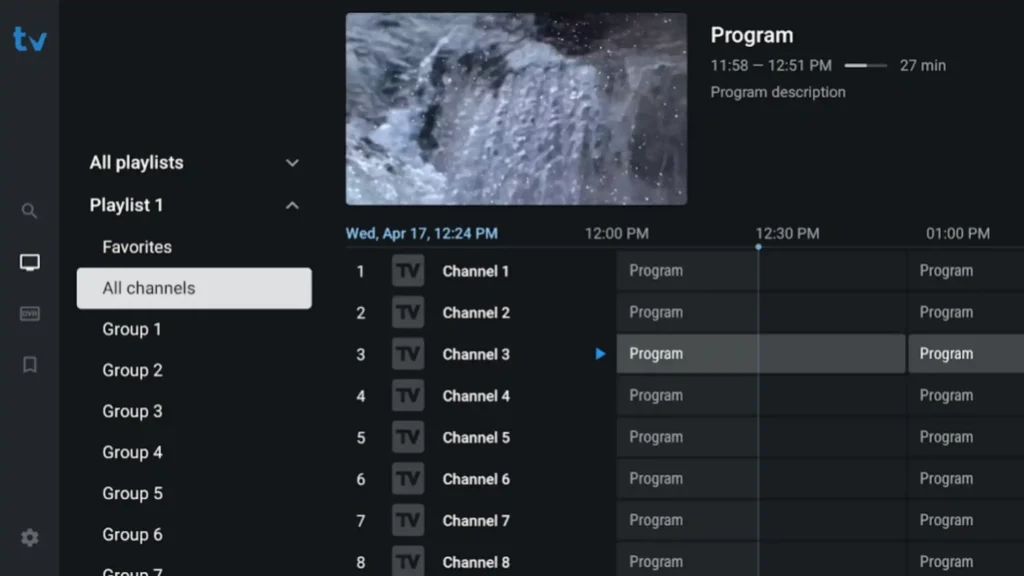
TiviMate has earned a reputation as one of the most polished IPTV players available. While it was originally designed with Android TV in mind, it also performs well on Android phones with a clean interface, fast navigation, and powerful playlist management features.
Unlike simpler IPTV players, TiviMate focuses on creating a premium television experience. Its modern Electronic Program Guide (EPG), responsive channel switching, customizable layouts, and extensive personalization options make it feel much closer to a traditional cable or satellite TV interface.
If you regularly watch live television, especially sports channels, TiviMate is one of the strongest options available.
Key Features
- ✅ M3U Playlist support
- ✅ Xtream Codes support
- ✅ Multiple playlist management
- ✅ Electronic Program Guide (EPG)
- ✅ Favorites and custom channel groups
- ✅ Powerful search function
- ✅ Catch-up support (provider dependent)
- ✅ Recording support (Premium feature)
- ✅ Automatic playlist updates
- ✅ Channel logos
- ✅ Modern TV guide interface
- ✅ HD, Full HD, and 4K playback
Why We Recommend TiviMate
The biggest advantage of TiviMate is its user experience.
Everything feels fast and well organized. Browsing channels, viewing the TV guide, switching between categories, and searching for content all happen with minimal delay.
Users with large IPTV subscriptions containing thousands of channels will especially appreciate how efficiently TiviMate organizes content.
Its interface is one of the closest you’ll find to a traditional cable TV experience.
Pros
- Beautiful and modern interface
- Excellent Electronic Program Guide
- Extremely fast channel switching
- Supports multiple IPTV playlists
- Powerful channel organization
- Automatic playlist refresh
- Advanced customization options
- Stable playback for HD and 4K streams
- Regular updates from active developers
Cons
- Some advanced features require the Premium version.
- The interface is primarily optimized for Android TV, so some controls may feel better suited to larger screens.
- Beginners may need a little time to learn all of the customization options.
Performance Overview
Overall Expert Score: 9.8/10
Who Should Use TiviMate?
TiviMate is an excellent choice if you:
- Watch live TV every day.
- Follow football, basketball, or other live sports.
- Have more than one IPTV subscription.
- Want a premium-looking interface.
- Like organizing channels into custom groups.
- Prefer a traditional TV guide experience.
If you’re someone who spends several hours each week watching live television, TiviMate is one of the most enjoyable IPTV players to use.
Free vs. Premium Tivimate Player
TiviMate offers a capable free version, but many of its standout features are available through the Premium upgrade.
| Feature | Free | Premium |
|---|---|---|
| Live TV Playback | ✔ | ✔ |
| M3U Playlists | ✔ | ✔ |
| Electronic Program Guide (EPG) | ✔ | ✔ |
| Multiple Playlists | Limited | ✔ |
| Recording (DVR) | ✖ | ✔ |
| Advanced Customization | Limited | ✔ |
| Automatic Backups | ✖ | ✔ |
| Playlist Management | Basic | Advanced |
For casual users, the free version is often sufficient. However, users who rely on IPTV daily may find the Premium features worthwhile.
Tips for the Best Experience
To get the most out of TiviMate:
- Import your playlist using Xtream Codes if your IPTV provider supports it.
- Enable automatic EPG updates to keep program schedules current.
- Create custom favorites lists for quick access to frequently watched channels.
- Organize channels into categories to reduce scrolling.
- Update the app regularly for the latest improvements and compatibility fixes.
Verdict
TiviMate stands out because it prioritizes usability without sacrificing advanced functionality. Its polished design, fast performance, and excellent playlist management make it a favorite among experienced IPTV users.
If you’re looking for a player that feels like a professional television platform rather than a basic media app, TiviMate is one of the best choices available for Android users. While the Premium version unlocks additional capabilities, the free version still delivers an impressive streaming experience for most viewers.
Watch Every Match Smoothly
3. OTT Navigator IPTV – Best for Power Users and Advanced Customization
Overall Rating: ⭐⭐⭐⭐⭐ 9.7/10
Best For: Experienced IPTV users, multiple playlists, large channel libraries, and users who want complete control over their viewing experience.
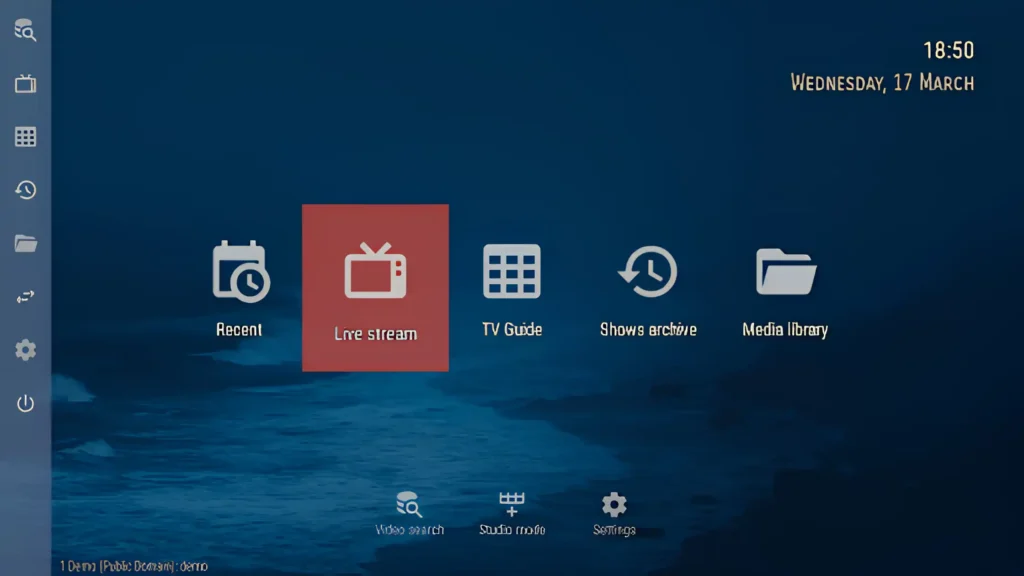
If customization is your top priority, OTT Navigator IPTV is one of the best free IPTV players for Android phones. Unlike many IPTV apps that keep things simple, OTT Navigator gives you extensive control over how your channels, playlists, categories, and Electronic Program Guide (EPG) are displayed.
It’s designed for users who want to personalize almost every aspect of their IPTV experience. From custom filters and channel grouping to advanced search tools and flexible playback settings, OTT Navigator offers features that few competitors can match.
Although beginners may find the interface slightly overwhelming at first, users who invest a little time learning the app are rewarded with one of the most powerful IPTV players available.
Key Features
- ✅ M3U Playlist support
- ✅ Xtream Codes API support
- ✅ Multiple playlist management
- ✅ Advanced Electronic Program Guide (EPG)
- ✅ Custom channel groups
- ✅ Favorite channels
- ✅ Advanced search and filtering
- ✅ Picture-in-Picture (supported devices)
- ✅ Catch-Up TV support
- ✅ Video on Demand (VOD)
- ✅ Automatic playlist refresh
- ✅ External player compatibility
- ✅ HD and 4K playback support
Why We Recommend OTT Navigator IPTV
What makes OTT Navigator different is the amount of control it gives users.
Instead of forcing everyone into the same layout, it allows you to organize your IPTV service exactly the way you want.
For example, you can:
- Hide channels you never watch.
- Create custom sports categories.
- Filter channels by language or country.
- Rearrange playlists.
- Save personalized favorites.
- Customize how the TV guide appears.
- Quickly search thousands of channels.
These features are especially valuable for users whose IPTV subscriptions include thousands of live TV channels and a large on-demand library.
Pros
- Extremely customizable interface
- Excellent support for multiple playlists
- Powerful search and filtering tools
- Fast navigation
- Reliable EPG support
- Smooth HD and 4K playback
- Picture-in-Picture support on compatible devices
- Frequent updates
- Works well with large IPTV libraries
Cons
- More complex than beginner-friendly IPTV players.
- Initial setup may take longer if you want to customize the interface.
- Some advanced options may feel unnecessary for casual viewers.
Performance Overview
Overall Expert Score: 9.7/10
Who Should Use OTT Navigator IPTV?
OTT Navigator is ideal if you:
- Manage multiple IPTV subscriptions.
- Watch channels from different countries.
- Want to organize thousands of channels efficiently.
- Prefer advanced filtering and search options.
- Like customizing your interface.
- Watch live TV every day.
It’s less suited to users who simply want a basic player with minimal setup.
Standout Features
Advanced Channel Filters
OTT Navigator lets you filter channels by:
- Category
- Country
- Language
- Favorites
- Recently watched
- Resolution
- Playlist source
Finding a specific channel becomes much easier, even in very large channel lists.
Smart Playlist Management
If you use more than one IPTV provider, OTT Navigator allows you to manage multiple playlists without switching between different apps.
This is particularly useful for users who separate:
- Sports
- Movies
- International channels
- Local television
- Backup IPTV services
Flexible TV Guide
The Electronic Program Guide is highly customizable.
You can:
- Adjust the guide layout.
- Change channel ordering.
- Display logos.
- Customize timeline views.
- Filter program categories.
This creates a more personalized viewing experience than many competing IPTV players.
Tips for the Best Experience
To get the most from OTT Navigator:
- Import playlists using Xtream Codes whenever possible for automatic channel and EPG synchronization.
- Create favorite lists for sports, news, and entertainment.
- Hide channels you never use to simplify navigation.
- Enable automatic playlist updates.
- Explore the filtering tools to organize large IPTV libraries more efficiently.
Verdict
OTT Navigator IPTV isn’t the easiest player to learn, but it’s one of the most powerful once you become familiar with its features.
Its exceptional playlist management, advanced filtering, customizable interface, and reliable playback make it one of the best free IPTV players for Android users who want maximum flexibility.
If you enjoy fine-tuning your streaming setup and managing large IPTV collections, OTT Navigator IPTV is one of the strongest choices available today.
4. Televizo – Best Free IPTV Player for Beginners
Overall Rating: ⭐⭐⭐⭐☆ 9.5/10
Best For: Beginners, casual users, lightweight performance, and users who want a simple IPTV experience.
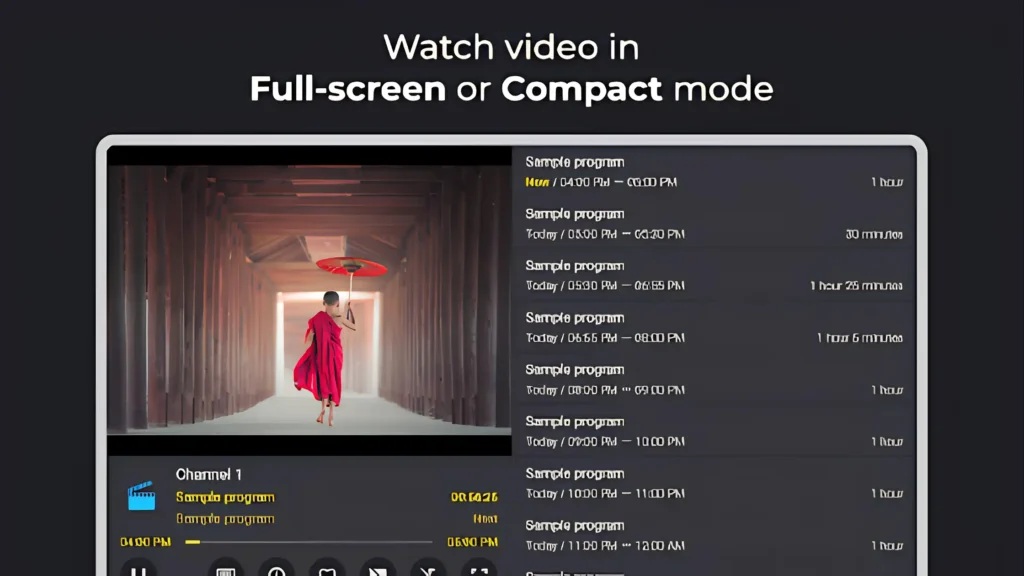
If you’re new to IPTV and don’t want to spend time learning dozens of settings, Televizo is one of the easiest IPTV players to start with. Its clean interface, straightforward setup, and reliable playback make it an excellent choice for Android users who simply want to import a playlist and start watching.
Unlike some advanced IPTV players that offer endless customization, Televizo focuses on speed, simplicity, and usability. The menus are easy to understand, playlists load quickly, and navigating between Live TV, Movies, and TV Series feels smooth even on older Android smartphones.
For users who value convenience over advanced configuration, Televizo strikes an excellent balance between features and ease of use.
Key Features
- ✅ M3U Playlist support
- ✅ Xtream Codes API support
- ✅ Electronic Program Guide (EPG)
- ✅ Video on Demand (VOD)
- ✅ Live TV support
- ✅ Favorites management
- ✅ Search functionality
- ✅ Multiple playlist support
- ✅ External player compatibility
- ✅ HD and 4K playback
- ✅ Automatic playlist refresh
Why We Recommend Televizo
Televizo stands out because it removes much of the complexity often associated with IPTV players.
The setup process is simple:
- Install the app.
- Add your playlist.
- Wait for synchronization.
- Start watching.
Within a few minutes, most users can access their complete IPTV library without adjusting complicated settings.
The interface is responsive and well organized, making it easy to browse thousands of channels without feeling overwhelmed.
Pros
- Very beginner friendly
- Fast and lightweight
- Clean interface
- Excellent M3U compatibility
- Reliable Xtream Codes support
- Smooth Electronic Program Guide
- Good playback stability
- Regular updates
- Works well on entry-level Android phones
Cons
- Fewer customization options than OTT Navigator.
- Interface is simpler than TiviMate.
- Some advanced features require the Premium version.
Performance Overview
Overall Expert Score: 9.5/10
Who Should Use Televizo?
Televizo is a great option if you:
- Are installing an IPTV player for the first time.
- Prefer a simple interface.
- Don’t need extensive customization.
- Use one IPTV subscription.
- Want reliable HD playback.
- Own an older Android smartphone with limited resources.
It’s especially well suited to users who value ease of use over advanced configuration.
Standout Features
Simple and Fast Setup
One of Televizo’s biggest strengths is how quickly you can get started.
Whether you use an M3U playlist or Xtream Codes, the import process is straightforward and requires very little technical knowledge.
Smooth Performance on Older Devices
Televizo is lightweight compared with many feature-rich IPTV players.
Because it uses system resources efficiently, it performs well on:
- Older Android phones
- Budget smartphones
- Mid-range devices
- Android tablets
Users with less powerful hardware will appreciate its responsive interface and stable playback.
Clean Electronic Program Guide
The integrated TV guide is easy to read and navigate.
You can quickly:
- Browse upcoming programs.
- View channel schedules.
- Search for broadcasts.
- Access favorite channels.
The uncluttered layout makes it easy to find the content you’re looking for.
Tips for the Best Experience
For the best results:
- Use Xtream Codes if your IPTV provider supports it for automatic channel and EPG loading.
- Refresh the playlist periodically to keep your channel list current.
- Add frequently watched channels to your Favorites section.
- Keep the app updated to benefit from new features and performance improvements.
These small steps can help maintain a smooth streaming experience over time.
Verdict
Televizo may not include every advanced feature available in players like TiviMate or OTT Navigator, but that’s exactly what makes it appealing.
Its lightweight design, intuitive interface, reliable playback, and simple setup make it one of the best free IPTV players for Android beginners.
If you’re looking for an IPTV player that’s easy to install, easy to use, and dependable for everyday streaming, Televizo is one of the strongest choices available.
5. XCIPTV Player – Best IPTV Player for Live Sports and Fast Streaming
Overall Rating: ⭐⭐⭐⭐☆ 9.4/10
Best For: Sports fans, live TV viewers, football enthusiasts, and users looking for fast channel switching.
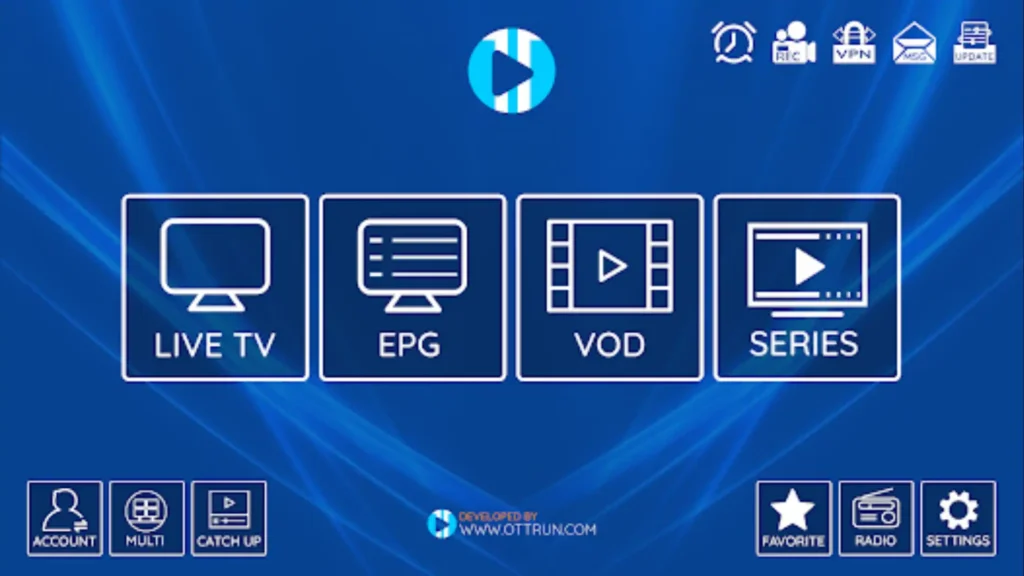
When it comes to watching live sports, speed and stability matter just as much as picture quality. XCIPTV Player has become one of the most popular free IPTV players for Android because it offers a smooth live TV experience, responsive navigation, and excellent compatibility with modern IPTV services.
The app is designed with simplicity in mind while still including advanced features such as Xtream Codes API, M3U playlist support, Electronic Program Guide (EPG), and Video on Demand (VOD). Whether you’re watching football, basketball, Formula 1, or other live events, XCIPTV delivers a clean and reliable viewing experience.
Key Features
- ✅ M3U Playlist support
- ✅ Xtream Codes API login
- ✅ Electronic Program Guide (EPG)
- ✅ Live TV streaming
- ✅ Video on Demand (VOD)
- ✅ TV Series support
- ✅ External player compatibility
- ✅ Built-in video player
- ✅ Favorites management
- ✅ Search functionality
- ✅ HD and 4K playback
- ✅ Multi-screen support (provider dependent)
Why We Recommend XCIPTV Player
XCIPTV focuses on what most IPTV users care about: watching live television with minimal delays and a straightforward interface.
The application loads playlists quickly, switches channels efficiently, and keeps navigation simple without sacrificing essential features.
For sports fans who regularly jump between multiple live events, the fast channel switching is one of its biggest strengths.
Pros
- Excellent for live sports
- Fast channel switching
- Clean and modern interface
- Reliable M3U support
- Full Xtream Codes compatibility
- Built-in media player
- Supports external players like VLC and MX Player
- Smooth HD and 4K playback
- Easy playlist management
- Stable performance on most Android phones
Cons
- Interface customization is more limited than OTT Navigator.
- Some advanced functions depend on your IPTV provider.
- A few features may vary depending on the app version.
Performance Overview
Overall Expert Score: 9.4/10
Who Should Use XCIPTV Player?
XCIPTV is an excellent choice if you:
- Watch live football regularly.
- Follow multiple sports channels.
- Want quick channel switching.
- Prefer a simple interface.
- Need support for both M3U playlists and Xtream Codes.
- Watch live TV every day.
It’s particularly well suited to users who spend more time watching live channels than browsing movies or TV series.
Standout Features
Excellent Live TV Experience
XCIPTV is optimized for live television, making it a great option for sports fans.
Its responsive interface helps you move between channels quickly during live events without unnecessary delays.
Built-in and External Player Support
The app includes its own built-in player but also lets you use external players if you prefer.
Compatible options include:
- VLC Media Player
- MX Player
- Other supported Android media players
This flexibility gives users more control over playback and codec compatibility.
Easy Playlist Management
Adding your IPTV service is simple.
Supported login methods include:
- M3U playlist URL
- Xtream Codes API
Once connected, the app automatically organizes:
- Live TV
- Movies
- TV Series
- Categories
- Electronic Program Guide (EPG)
This helps reduce setup time and keeps everything organized.
Tips for the Best Experience
To get the best performance from XCIPTV:
- Use Xtream Codes when available for automatic synchronization.
- Keep your playlists updated.
- Refresh the EPG regularly.
- Add your favorite sports channels for faster access.
- Enable hardware decoding if your device supports it for smoother HD and 4K playback.
These settings can improve responsiveness during live broadcasts.
Verdict
XCIPTV Player delivers exactly what many Android users want from an IPTV player: reliable playback, quick setup, and an interface that keeps the focus on live television.
While it doesn’t offer as many customization options as OTT Navigator or TiviMate, it excels where it matters most for sports enthusiasts—fast channel switching, dependable playback, and broad compatibility with modern IPTV services.
If your main goal is watching football, live sports, and television without unnecessary complexity, XCIPTV Player is one of the best free IPTV players available for Android phones.
Watch Every Match Smoothly
6. Sparkle TV – Best IPTV Player with a Premium TV-Like Experience
Overall Rating: ⭐⭐⭐⭐☆ 9.3/10
Best For: Users who want a traditional TV interface, Android TV owners, and viewers who enjoy an organized Electronic Program Guide (EPG).
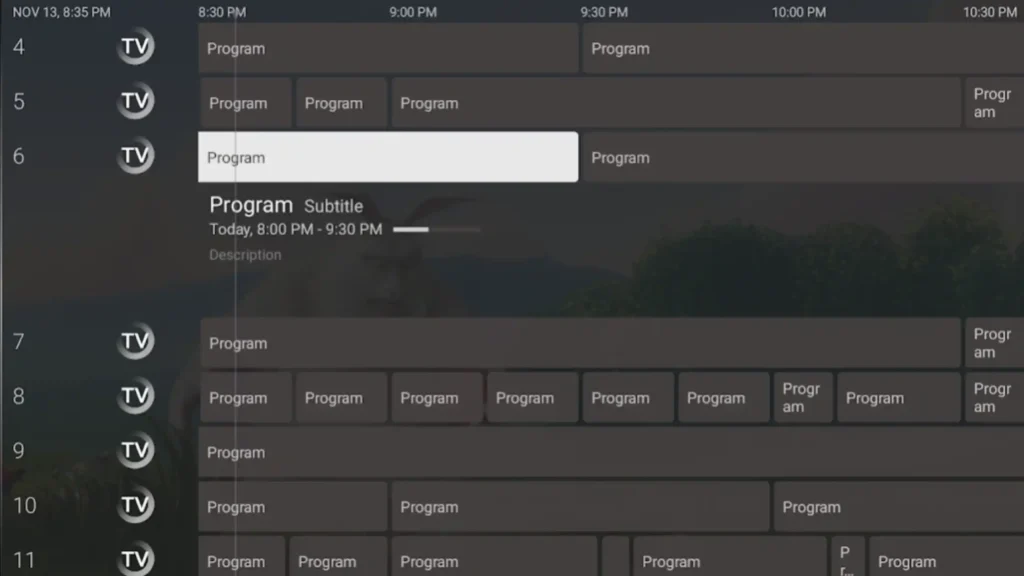
If you’re looking for an IPTV player that feels similar to a traditional cable or satellite TV receiver, Sparkle TV is an excellent choice. Its modern interface, well-designed TV guide, and smooth navigation make it one of the most polished IPTV players available.
Although Sparkle TV is primarily designed for Android TV devices, it also works well on Android phones. Users who prefer a clean interface with an emphasis on live television will appreciate its straightforward design and responsive performance.
Rather than overwhelming users with dozens of settings, Sparkle TV focuses on delivering a simple, enjoyable viewing experience while still supporting the features most IPTV users expect.
Key Features
- ✅ M3U Playlist support
- ✅ Xtream Codes support
- ✅ Electronic Program Guide (EPG)
- ✅ Live TV support
- ✅ Video on Demand (provider dependent)
- ✅ Multiple playlist support
- ✅ Favorites management
- ✅ Channel logos
- ✅ Automatic playlist updates
- ✅ HD and 4K playback
- ✅ DVR and recording support (available in supported versions)
Why We Recommend Sparkle TV
Sparkle TV excels at making IPTV feel familiar.
Its television-style interface closely resembles the experience of browsing channels on a traditional cable box, making it especially comfortable for users transitioning from conventional television to IPTV.
Navigation is smooth, channel categories are well organized, and the Electronic Program Guide is one of the cleanest available in any IPTV player.
Pros
- Modern and elegant interface
- Excellent TV guide layout
- Easy channel navigation
- Reliable M3U compatibility
- Xtream Codes support
- Stable HD and 4K playback
- Automatic playlist synchronization
- Regular software updates
- Great experience on Android TV devices
Cons
- Designed primarily for Android TV, so some interface elements are better suited to larger screens.
- Fewer advanced customization options than OTT Navigator.
- Some premium features may require a paid upgrade.
Performance Overview
Overall Expert Score: 9.3/10
Who Should Use Sparkle TV?
Sparkle TV is a great choice if you:
- Prefer a traditional television experience.
- Watch live TV more often than on-demand content.
- Like browsing channels with a detailed TV guide.
- Use both an Android phone and an Android TV device.
- Want a clean interface that’s easy to navigate.
It’s especially appealing to users who value simplicity and an organized viewing experience over extensive customization.
Standout Features
Premium Television Interface
Sparkle TV places a strong emphasis on usability.
Its layout is designed to resemble a modern television guide, making it easy to:
- Browse channels
- View current and upcoming programs
- Access favorites
- Switch between categories
- Find live broadcasts quickly
The familiar layout reduces the learning curve for new IPTV users.
Excellent Electronic Program Guide (EPG)
The integrated EPG is one of Sparkle TV’s strongest features.
You can:
- View detailed program schedules.
- Browse multiple channels simultaneously.
- See upcoming broadcasts.
- Navigate quickly between categories.
For viewers who rely on TV schedules, this creates a much more enjoyable experience than basic channel lists.
Smooth Playback Performance
Sparkle TV handles HD and 4K streams efficiently on compatible Android devices.
Combined with automatic playlist updates and responsive navigation, it delivers consistent performance for everyday IPTV viewing.
As with any IPTV player, overall streaming quality also depends on your IPTV provider and internet connection.
Tips for the Best Experience
To get the most from Sparkle TV:
- Import your IPTV account using Xtream Codes if available.
- Enable automatic playlist and EPG updates.
- Organize frequently watched channels into Favorites.
- Keep the app updated to benefit from new features and bug fixes.
- Use a stable Wi-Fi connection for HD and 4K streaming.
Verdict
Sparkle TV offers one of the most polished television-style interfaces among free IPTV players.
While it doesn’t provide the same level of advanced customization as OTT Navigator or the extensive premium ecosystem of TiviMate, it excels at delivering a familiar, intuitive viewing experience with an excellent Electronic Program Guide.
If you want an IPTV player that feels like a modern cable TV receiver while remaining easy to use, Sparkle TV is one of the best free options available for Android users.
7. Perfect Player IPTV – Best Lightweight IPTV Player for Older Android Phones
Overall Rating: ⭐⭐⭐⭐☆ 9.1/10
Best For: Older Android smartphones, budget devices, users who prefer a lightweight IPTV player, and those who value stability over advanced features.
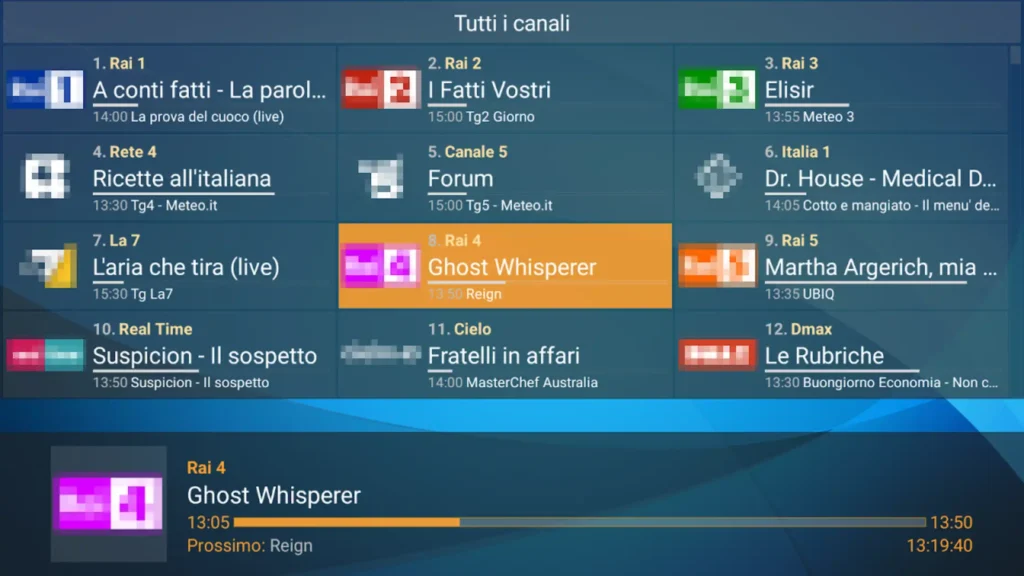
Although newer IPTV players have introduced more modern interfaces and additional functionality, Perfect Player IPTV remains a popular choice among Android users who want a lightweight, dependable application.
Its greatest strength is efficiency. The app runs smoothly on older smartphones and entry-level Android devices where heavier IPTV players may feel slow or consume more system resources.
While its interface looks more traditional than apps like IPTV Smarters Pro or TiviMate, Perfect Player continues to deliver solid playback, reliable playlist support, and a responsive Electronic Program Guide for users who prioritize performance over visual design.
Key Features
- ✅ M3U Playlist support
- ✅ XMLTV Electronic Program Guide (EPG)
- ✅ Multiple playlist support
- ✅ Channel grouping
- ✅ Favorites management
- ✅ External player compatibility
- ✅ HD playback
- ✅ Hardware decoding support
- ✅ Lightweight application
- ✅ Low system resource usage
Why We Recommend Perfect Player IPTV
Not everyone owns the latest flagship smartphone.
If you’re using an older Android phone or simply want an IPTV player that launches quickly and uses very little memory, Perfect Player is still an excellent option.
Its streamlined design allows channels to load efficiently without placing unnecessary strain on your device.
For users who mainly watch live television and don’t need advanced customization, it remains a dependable solution.
Pros
- Very lightweight
- Excellent performance on older Android phones
- Low RAM and storage usage
- Smooth channel playback
- Reliable M3U compatibility
- Good Electronic Program Guide support
- Stable long-term performance
- Supports external media players
- Easy to organize favorite channels
Cons
- Interface feels dated compared to newer IPTV players.
- No native Xtream Codes login in the traditional sense (setup may require playlist configuration depending on your provider).
- Limited modern features compared with IPTV Smarters Pro or OTT Navigator.
- Development activity has been less frequent than some newer competitors.
Performance Overview
Overall Expert Score: 9.1/10
Who Should Use Perfect Player IPTV?
Perfect Player is ideal if you:
- Own an older Android smartphone.
- Use a budget Android device.
- Prefer a lightweight application.
- Mainly watch live TV.
- Don’t need extensive customization.
- Value stability and low resource usage.
If your phone has limited RAM or storage, Perfect Player can provide a smoother experience than some feature-heavy alternatives.
Standout Features
Excellent Performance on Older Hardware
One of Perfect Player’s biggest advantages is its efficient use of system resources.
Compared with many modern IPTV applications, it typically requires:
- Less RAM
- Less storage space
- Lower CPU usage
This helps maintain smooth navigation and reliable playback on entry-level Android devices.
Reliable Playlist Support
Perfect Player works well with standard IPTV playlist formats.
Supported formats include:
- M3U playlists
- XMLTV EPG
Once configured correctly, channels and program guides are displayed in a clear and organized layout.
External Player Compatibility
Users who prefer additional codec support can pair Perfect Player with compatible Android media players.
This provides greater flexibility for different video formats and streaming requirements.
Tips for the Best Experience
To get the best results with Perfect Player:
- Keep your M3U playlist updated.
- Configure your XMLTV EPG for accurate program information.
- Use hardware decoding if your device supports it.
- Pair the app with an external media player if you experience playback issues.
- Remove unused playlists to keep navigation fast.
Verdict
Perfect Player IPTV may no longer have the most modern interface, but it continues to deliver where it matters most: stability, efficiency, and dependable IPTV playback.
For users with older Android phones or anyone looking for a lightweight IPTV player that focuses on the essentials, Perfect Player remains a practical and reliable choice.
If you value modern design and advanced features, newer players like IPTV Smarters Pro or TiviMate may be a better fit. However, if performance on low-powered hardware is your priority, Perfect Player still deserves a place among the best free IPTV players for Android.
8. Kodi – Best Open-Source IPTV Media Center for Android
Overall Rating: ⭐⭐⭐⭐☆ 9.0/10
Best For: Advanced users, media enthusiasts, home entertainment systems, and users who want extensive customization.
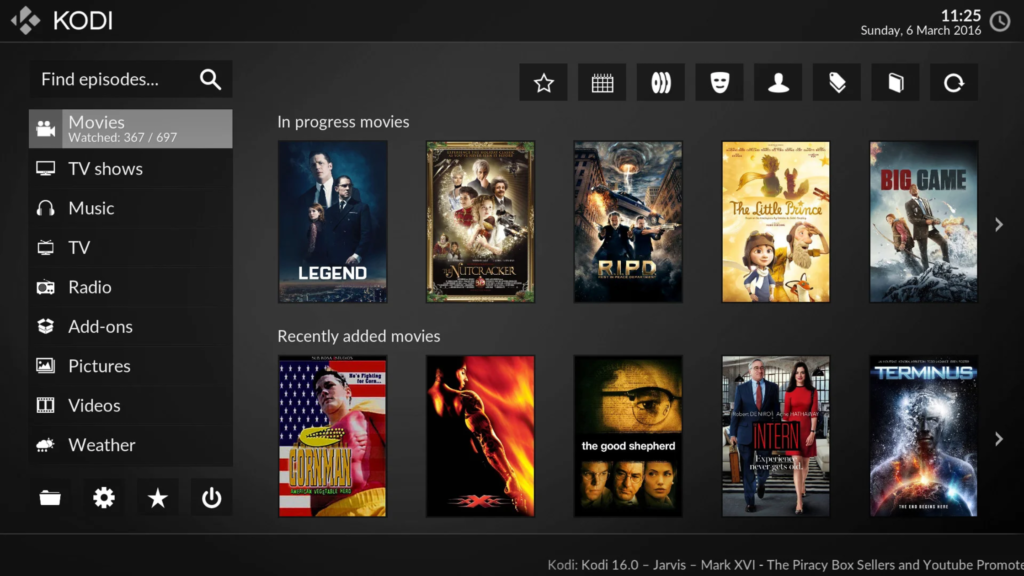
Unlike the other apps in this guide, Kodi isn’t exclusively an IPTV player. Instead, it’s a powerful open-source media center capable of organizing local media, streaming content, and playing IPTV playlists through supported add-ons or the built-in IPTV Simple Client.
Because of its flexibility, Kodi has become one of the most popular entertainment applications for Android, Android TV, Windows, macOS, Linux, and other platforms.
If you’re looking for an all-in-one media center that combines IPTV with movies, TV shows, music, and personal media libraries, Kodi is an excellent choice.
Key Features
- ✅ M3U Playlist support
- ✅ XMLTV Electronic Program Guide (EPG)
- ✅ IPTV Simple Client compatibility
- ✅ Live TV support
- ✅ Video on Demand (provider dependent)
- ✅ Local media library
- ✅ Subtitle support
- ✅ Multiple themes
- ✅ Extensive customization
- ✅ Add-on ecosystem
- ✅ HD and 4K playback
- ✅ Multi-platform compatibility
Why We Recommend Kodi
Kodi’s biggest advantage is flexibility.
Rather than focusing only on IPTV, it lets users build a complete entertainment hub.
With the appropriate configuration, Kodi can manage:
- Live TV
- Movies
- TV series
- Music
- Photos
- Podcasts
- Local video collections
This makes it an attractive solution for users who want everything organized within a single application.
Pros
- Completely free and open source
- Highly customizable
- Excellent media library management
- Supports M3U playlists
- Powerful Electronic Program Guide
- Large developer community
- Available on multiple operating systems
- Supports HD and 4K playback
- Regular software updates
Cons
- More complex to configure than dedicated IPTV players.
- IPTV functionality requires additional setup.
- The interface can feel overwhelming for first-time users.
- Some third-party add-ons may become outdated or unsupported.
Performance Overview
Overall Expert Score: 9.0/10
Who Should Use Kodi?
Kodi is ideal if you:
- Want more than just an IPTV player.
- Manage a large personal media library.
- Enjoy customizing your entertainment system.
- Use multiple streaming sources.
- Have experience configuring media applications.
- Watch content across several devices.
If your primary goal is simply watching IPTV with minimal setup, dedicated players like IPTV Smarters Pro or Televizo may be easier to use.
Standout Features
Complete Media Center
Kodi goes far beyond IPTV.
Within one application, you can organize:
- Live television
- Movies
- TV shows
- Music
- Photos
- Home videos
- Podcasts
Everything is presented through a customizable interface that can be tailored to your preferences.
IPTV Simple Client
Kodi supports IPTV through the IPTV Simple Client, which allows you to import:
- M3U playlists
- XMLTV EPG files
Once configured, your channels appear alongside the TV guide, creating a familiar television experience.
Extensive Customization
Kodi offers more customization than almost any other media application.
You can:
- Change themes.
- Install official add-ons.
- Customize menus.
- Organize media libraries.
- Personalize navigation.
- Configure playback settings.
This level of flexibility makes Kodi especially popular with advanced users.
Tips for the Best Experience
To get the most from Kodi:
- Use the official IPTV Simple Client for IPTV playlists.
- Keep Kodi updated to the latest stable version.
- Download add-ons only from trusted repositories.
- Organize playlists into categories for easier navigation.
- Use a fast internet connection for HD and 4K streaming.
Proper setup helps ensure a smoother and more reliable experience.
Verdict
Kodi remains one of the most powerful media applications available.
Although it requires more setup than dedicated IPTV players, it rewards users with exceptional flexibility, extensive customization, and the ability to manage virtually every type of media from a single interface.
If you’re looking for an all-in-one entertainment platform rather than a simple IPTV app, Kodi is one of the best free options available for Android users.
Watch Every Match Smoothly
9. VLC Media Player – Best Lightweight Free Player for M3U Playlists
Overall Rating: ⭐⭐⭐⭐☆ 8.8/10
Best For: Users who want a simple IPTV player, lightweight performance, local media playback, and maximum video format compatibility.
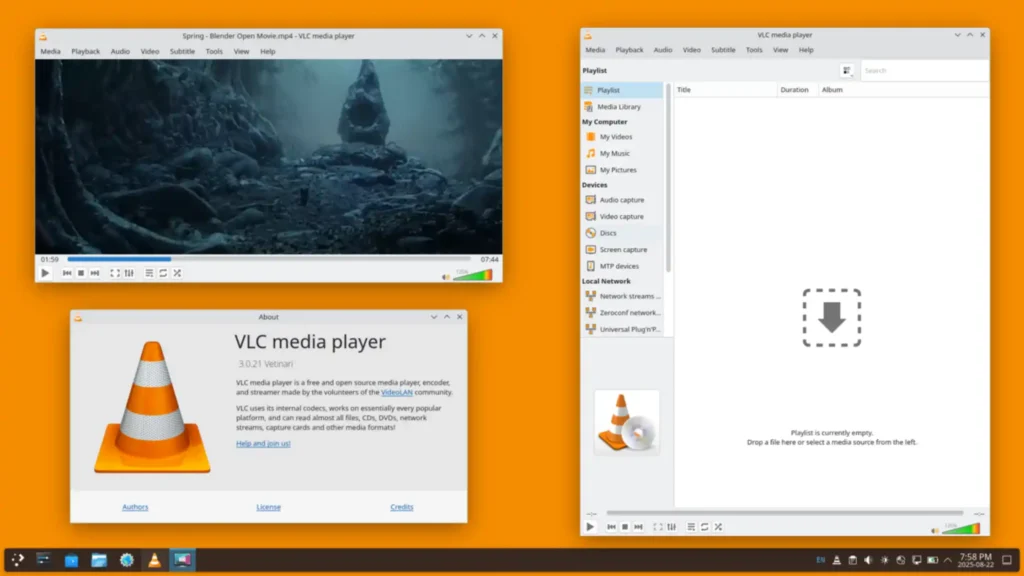
VLC Media Player is one of the most trusted multimedia applications available and has been downloaded by millions of users worldwide. Although it isn’t a dedicated IPTV player like IPTV Smarters Pro or TiviMate, VLC can easily stream IPTV channels using M3U playlists and is an excellent option for users who prefer a lightweight, no-frills solution.
Its biggest advantage is compatibility. VLC supports virtually every popular video and audio format without requiring additional codecs, making it one of the most reliable media players for Android.
If your primary goal is simply opening an M3U playlist and watching live TV, VLC offers one of the easiest ways to get started.
Key Features
- ✅ M3U Playlist support
- ✅ Wide video codec compatibility
- ✅ Hardware acceleration
- ✅ Subtitle support
- ✅ Audio track selection
- ✅ Network stream playback
- ✅ Local media playback
- ✅ HD and 4K video support
- ✅ Chromecast support (supported devices and versions)
- ✅ Completely free with no advertisements
Why We Recommend VLC
VLC focuses on stability and playback rather than IPTV-specific features.
Instead of providing channel categories, TV guides, or advanced IPTV management, it simply plays your streams efficiently.
For users who don’t need an Electronic Program Guide (EPG) or advanced playlist organization, VLC is one of the fastest and most reliable solutions available.
Pros
- Completely free
- No advertisements
- Lightweight and fast
- Excellent playback stability
- Supports almost every video format
- Simple interface
- Hardware acceleration
- Regular software updates
- Available on multiple operating systems
Cons
- No native Xtream Codes support.
- No built-in Electronic Program Guide (EPG).
- Limited IPTV organization features.
- Not designed for managing large IPTV channel lists.
- No advanced IPTV interface.
Performance Overview
Overall Expert Score: 8.8/10
Who Should Use VLC Media Player?
VLC is an excellent choice if you:
- Want a completely free media player.
- Only use M3U playlists.
- Prefer a lightweight application.
- Watch both IPTV and local video files.
- Need broad support for different media formats.
- Don’t require advanced IPTV features such as channel grouping or TV guides.
If you mainly want a straightforward player without extra menus or configuration, VLC is a dependable option.
Standout Features
Outstanding Codec Support
One of VLC’s greatest strengths is its ability to play almost any media format.
It supports a wide range of video and audio codecs, reducing compatibility issues and eliminating the need to install additional codec packs.
Extremely Lightweight
VLC is optimized for speed and efficiency.
It starts quickly, uses relatively few system resources, and performs well on both older and newer Android devices.
This makes it a good option for users with entry-level smartphones or limited storage space.
Reliable Network Stream Playback
VLC allows you to open network streams directly.
You can:
- Load an M3U playlist.
- Open individual stream URLs.
- Watch live television.
- Play local media files.
- Resume previously watched content.
Its simple approach appeals to users who value reliability over advanced IPTV management.
Tips for the Best Experience
To get the most from VLC:
- Use a valid M3U playlist from your IPTV provider.
- Enable hardware acceleration for smoother HD and 4K playback.
- Keep VLC updated to benefit from performance improvements.
- Organize frequently used playlists for quicker access.
- Use a stable internet connection when streaming live TV.
These small adjustments can improve playback quality and reduce interruptions.
Verdict
VLC Media Player isn’t designed to replace dedicated IPTV applications, but it excels as a lightweight media player with excellent M3U playlist support.
Its stability, broad codec compatibility, and straightforward interface make it a great choice for users who simply want to open a playlist and start watching.
If you need advanced IPTV features such as Xtream Codes, Electronic Program Guides, multiple playlist management, or channel organization, apps like IPTV Smarters Pro or TiviMate will provide a more complete experience. However, for users who prioritize simplicity and dependable playback, VLC remains one of the best free media players available for Android.
10. NexTv IPTV – Best Modern IPTV Player for Android
Overall Rating: ⭐⭐⭐⭐☆ 8.9/10
Best For: Users looking for a clean interface, modern design, and a simple IPTV experience.
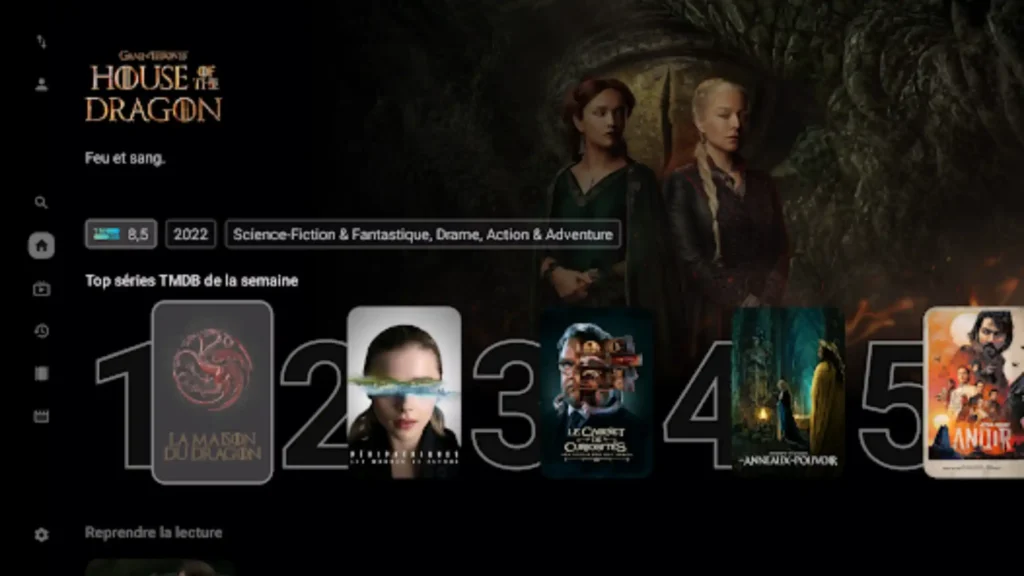
If you prefer a modern-looking IPTV player with an intuitive layout, NexTv IPTV is worth considering. It combines a polished user interface with support for the most common IPTV playlist formats, making it a strong alternative to more established players.
While it doesn’t offer quite as many advanced customization options as TiviMate or OTT Navigator, NexTv IPTV focuses on ease of use and everyday performance. The result is an application that’s approachable for beginners while still offering the features most IPTV users need.
Key Features
- ✅ M3U Playlist support
- ✅ Xtream Codes API support
- ✅ Electronic Program Guide (EPG)
- ✅ Live TV
- ✅ Video on Demand (VOD)
- ✅ TV Series support
- ✅ Favorites management
- ✅ Search function
- ✅ Modern user interface
- ✅ HD and 4K playback support
Why We Recommend NexTv IPTV
NexTv IPTV is designed for users who want a clean and uncomplicated viewing experience.
The interface is easy to navigate, playlists are organized into logical categories, and finding live TV channels or on-demand content requires very little effort.
For users switching from traditional television or another streaming platform, the layout feels familiar and easy to learn.
Pros
- Modern and attractive interface
- Easy setup
- M3U playlist support
- Xtream Codes compatibility
- Good Electronic Program Guide
- Smooth HD playback
- Simple navigation
- Beginner friendly
- Regular improvements
Cons
- Fewer advanced customization tools than OTT Navigator.
- Smaller user community than IPTV Smarters Pro or TiviMate.
- Some advanced features depend on the IPTV provider being used.
Performance Overview
Overall Expert Score: 8.9/10
Who Should Use NexTv IPTV?
NexTv IPTV is a great fit if you:
- Want a modern interface.
- Prefer simple navigation.
- Use M3U playlists or Xtream Codes.
- Watch live TV and on-demand content.
- Are new to IPTV.
- Want an app that’s easy to configure.
It’s an excellent middle ground between feature-rich IPTV players and minimalist media players.
Standout Features
Modern User Interface
NexTv IPTV emphasizes clarity and usability.
The application separates content into categories such as:
- Live TV
- Movies
- TV Series
- Favorites
This organization helps users quickly find what they want without navigating complicated menus.
Quick Playlist Import
Adding an IPTV account is straightforward.
Supported methods include:
- M3U Playlist URL
- Xtream Codes API
After importing your credentials, the app automatically loads channels and compatible EPG information.
Smooth Everyday Performance
NexTv IPTV performs well on most modern Android smartphones.
Navigation is responsive, playback is reliable, and switching between channels is generally quick, making it a solid choice for daily IPTV viewing.
Tips for the Best Experience
To get the most from NexTv IPTV:
- Use Xtream Codes if your IPTV provider supports it.
- Refresh playlists regularly to keep your channel list current.
- Enable automatic EPG updates.
- Save frequently watched channels to Favorites.
- Keep the app updated for the latest improvements.
Verdict
NexTv IPTV offers an appealing combination of simplicity, modern design, and reliable performance.
Although it doesn’t include every advanced feature found in TiviMate or OTT Navigator, it provides an excellent user experience for everyday streaming and supports the playlist formats most IPTV users rely on.
If you’re looking for a clean, easy-to-use IPTV player that works well on Android phones, NexTv IPTV is a strong option worth trying.
Which IPTV Player Should You Choose?
After reviewing the top 10 IPTV players, here’s a quick recommendation based on different needs.
| If You Want… | Recommended IPTV Player |
|---|---|
| 🏆 Best Overall | IPTV Smarters Pro |
| ⚡ Best Premium Experience | TiviMate |
| 🔧 Most Customization | OTT Navigator IPTV |
| 👶 Best for Beginners | Televizo |
| ⚽ Best for Live Sports | XCIPTV Player |
| 📺 Best TV-Style Interface | Sparkle TV |
| 📱 Best for Older Android Phones | Perfect Player IPTV |
| 💻 Best Open-Source Media Center | Kodi |
| 🎬 Best Lightweight Media Player | VLC Media Player |
| ✨ Best Modern Alternative | NexTV IPTV |
No single IPTV player is perfect for everyone. The right choice depends on your streaming habits, preferred features, and the IPTV service you use.
If you’re new to IPTV, IPTV Smarters Pro or Televizo are excellent starting points. If you’re an experienced user who wants maximum control, TiviMate and OTT Navigator IPTV offer the most advanced feature sets. Sports fans will appreciate the responsiveness of XCIPTV, while users with older devices may prefer the lightweight performance of Perfect Player or VLC.
Watch Every Match Smoothly
Complete Feature Comparison: Which IPTV Player Is Right for You?
Choosing the best IPTV player isn’t just about downloading the most popular app. Every player offers a different balance of performance, compatibility, customization, and ease of use.
The comparison below summarizes the most important features to help you quickly identify the IPTV player that best matches your needs.
IPTV Player Feature Comparison
| Feature | IPTV Smarters Pro | TiviMate | OTT Navigator | Televizo | XCIPTV | Sparkle TV | Perfect Player | Kodi | VLC | NexTv IPTV |
|---|---|---|---|---|---|---|---|---|---|---|
| Free Version | ✓ | ✓ | ✓ | ✓ | ✓ | ✓ | ✓ | ✓ | ✓ | ✓ |
| M3U Playlist | ✓ | ✓ | ✓ | ✓ | ✓ | ✓ | ✓ | ✓ | ✓ | ✓ |
| Xtream Codes | ✓ | ✓ | ✓ | ✓ | ✓ | ✓ | Partial | Plugin / Setup | ✕ | ✓ |
| EPG Support | ✓ | ✓ | ✓ | ✓ | ✓ | ✓ | ✓ | ✓ | ✕ | ✓ |
| Live TV | ✓ | ✓ | ✓ | ✓ | ✓ | ✓ | ✓ | ✓ | ✓ | ✓ |
| Movies (VOD) | ✓ | ✓ | ✓ | ✓ | ✓ | ✓ | Limited | ✓ | Limited | ✓ |
| TV Series | ✓ | ✓ | ✓ | ✓ | ✓ | Provider Dependent | Limited | ✓ | ✕ | ✓ |
| Favorites | ✓ | ✓ | ✓ | ✓ | ✓ | ✓ | ✓ | ✓ | ✕ | ✓ |
| Search | ✓ | ✓ | ✓ | ✓ | ✓ | ✓ | Basic | ✓ | Basic | ✓ |
| Multiple Playlists | ✓ | ✓ | ✓ | ✓ | Limited | ✓ | Limited | ✓ | ✕ | ✓ |
| External Player Support | ✓ | ✓ | ✓ | ✓ | ✓ | Limited | ✓ | ✓ | Built-in | Limited |
| Chromecast | ✓ | Limited | ✓ | ✕ | Limited | Limited | ✕ | ✓ | ✓ | Limited |
| HD Playback | ✓ | ✓ | ✓ | ✓ | ✓ | ✓ | ✓ | ✓ | ✓ | ✓ |
| 4K Playback | ✓ | ✓ | ✓ | ✓ | ✓ | ✓ | ✓ | ✓ | ✓ | ✓ |
| Hardware Acceleration | ✓ | ✓ | ✓ | ✓ | ✓ | ✓ | ✓ | ✓ | ✓ | ✓ |
| Automatic Playlist Refresh | ✓ | ✓ | ✓ | ✓ | ✓ | ✓ | Limited | Manual | ✕ | ✓ |
| Automatic EPG Updates | ✓ | ✓ | ✓ | ✓ | ✓ | ✓ | Limited | Manual | ✕ | ✓ |
| Android TV Support | ✓ | ✓ | ✓ | ✓ | ✓ | ✓ | ✓ | ✓ | ✓ | ✓ |
| Beginner Friendly | ⭐⭐⭐⭐⭐ | ⭐⭐⭐⭐☆ | ⭐⭐⭐☆☆ | ⭐⭐⭐⭐⭐ | ⭐⭐⭐⭐☆ | ⭐⭐⭐⭐☆ | ⭐⭐⭐⭐☆ | ⭐⭐⭐☆☆ | ⭐⭐⭐⭐⭐ | ⭐⭐⭐⭐⭐ |
| Advanced Customization | ⭐⭐⭐⭐☆ | ⭐⭐⭐⭐⭐ | ⭐⭐⭐⭐⭐ | ⭐⭐⭐☆☆ | ⭐⭐⭐⭐☆ | ⭐⭐⭐⭐☆ | ⭐⭐⭐☆☆ | ⭐⭐⭐⭐⭐ | ⭐⭐☆☆☆ | ⭐⭐⭐⭐☆ |
Which IPTV Player Wins in Each Category?
Instead of naming a single overall winner, it’s more helpful to choose the app that best matches your priorities.
| Category | Winner |
|---|---|
| 🏆 Best Overall | IPTV Smarters Pro |
| ⚡ Best User Interface | TiviMate |
| 🔧 Most Customizable | OTT Navigator IPTV |
| 👶 Best for Beginners | Televizo |
| ⚽ Best for Live Sports | XCIPTV Player |
| 📺 Best TV Guide (EPG) | TiviMate |
| 📱 Best for Older Android Phones | Perfect Player IPTV |
| 💻 Best Open-Source Solution | Kodi |
| 🎬 Best Lightweight Media Player | VLC Media Player |
| ✨ Best Modern Alternative | NexTv IPTV |
Which IPTV Player Should You Download?
Still not sure which app to install? Here’s a quick recommendation based on your viewing habits.
Choose IPTV Smarters Pro if you:
- Want the best all-around IPTV player.
- Need support for M3U and Xtream Codes.
- Watch live TV, movies, and series.
- Prefer a simple setup process.
Choose TiviMate if you:
- Watch live TV every day.
- Love a premium television interface.
- Want extensive customization.
- Manage large channel lists.
Choose OTT Navigator IPTV if you:
- Use multiple IPTV providers.
- Want advanced playlist management.
- Like organizing channels with filters and custom groups.
- Enjoy customizing your viewing experience.
Choose Televizo if you:
- Are new to IPTV.
- Want a lightweight, easy-to-use application.
- Prefer a clean and straightforward interface.
Choose XCIPTV Player if you:
- Mainly watch football and live sports.
- Need fast channel switching.
- Want a reliable everyday IPTV player.
Choose Sparkle TV if you:
- Prefer a traditional TV guide experience.
- Use Android TV alongside your phone.
- Value a polished television-style interface.
Choose Perfect Player if you:
- Own an older Android phone.
- Need a lightweight application.
- Prioritize stability over advanced features.
Choose Kodi if you:
- Want an all-in-one media center.
- Enjoy customizing your entertainment setup.
- Need IPTV alongside local media management.
Choose VLC Media Player if you:
- Only need basic M3U playback.
- Prefer a simple, lightweight media player.
- Don’t require IPTV-specific features like EPG or Xtream Codes.
Choose NexTv IPTV if you:
- Like modern interfaces.
- Want an easy setup process.
- Need a balanced IPTV player for everyday streaming.
Final Recommendation
If we had to recommend only three IPTV players for most Android users, they would be:
🥇 IPTV Smarters Pro – Best overall balance of features, simplicity, and compatibility.
🥈 TiviMate – Best premium-style interface and television experience.
🥉 OTT Navigator IPTV – Best for advanced users who want maximum control over playlists and customization.
These three apps consistently deliver excellent performance and support the features most IPTV users rely on, including M3U playlists, Xtream Codes, Electronic Program Guide (EPG), and HD/4K playback.
Watch Every Match Smoothly
How to Install an IPTV Player on Your Android Phone
Installing an IPTV player on an Android phone is quick and straightforward. Most of the apps featured in this guide are available through the Google Play Store, making installation simple and secure.
If a player isn’t listed on the Play Store, always download it from the official developer’s website. Avoid installing APK files from unknown sources, as they may contain outdated or modified versions of the app.
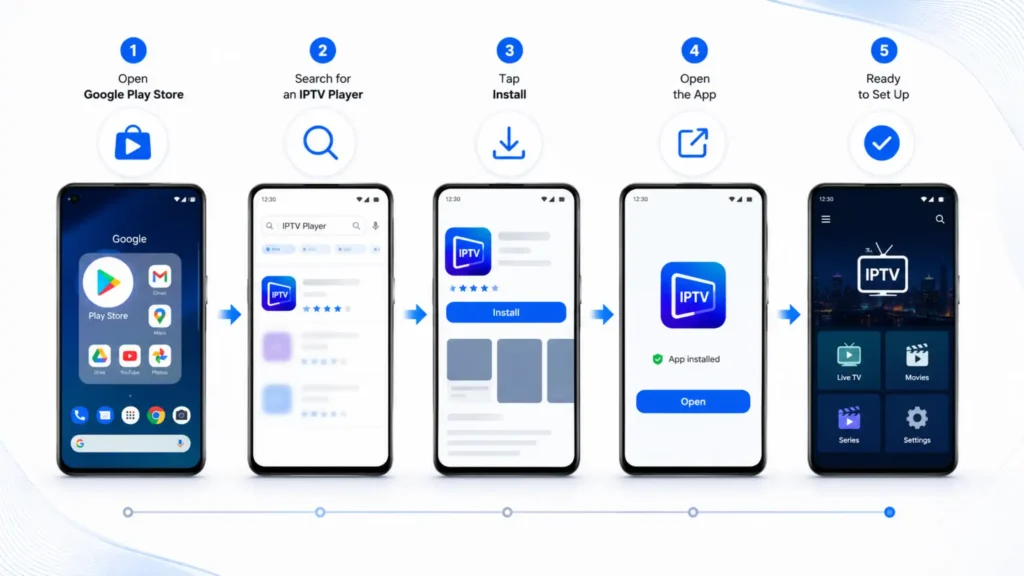
Method 1: Install from the Google Play Store (Recommended)
This is the safest and easiest installation method.
Step 1: Open the Google Play Store
Unlock your Android phone and launch the Google Play Store.
Make sure you’re connected to a stable Wi-Fi or mobile data connection.
Step 2: Search for Your Preferred IPTV Player
Use the search bar to find the IPTV player you want to install.
Popular options include:
- IPTV Smarters Pro
- TiviMate
- OTT Navigator IPTV
- Televizo
- XCIPTV Player
- Sparkle TV
- VLC Media Player
- Kodi
Always verify that you’re downloading the correct application from its official developer.
Step 3: Tap Install
Select the app from the search results and tap Install.
The download should begin automatically.
Depending on your internet speed, installation usually takes less than a minute.
Step 4: Open the Application
After installation is complete:
- Tap Open.
- Grant any required permissions.
- Continue to the login or playlist import screen.
At this point, the IPTV player is ready to be configured with your IPTV subscription.
Method 2: Install Using an APK File
Some IPTV players may not be available through the Google Play Store in every region.
In that case, you can install the app manually using an APK file.
Step 1: Download the APK
Visit the official website of the app developer and download the latest version.
Avoid unofficial APK websites whenever possible to reduce security risks.
Step 2: Allow Installation from Unknown Sources
Depending on your Android version:
- Open Settings.
- Go to Security or Privacy.
- Enable Install unknown apps for the browser or file manager you’re using.
Once the installation is complete, you can disable this permission again for added security.
Step 3: Install the APK
Locate the downloaded APK file.
Tap it and follow the on-screen instructions to complete the installation.
After a few seconds, the IPTV player will be ready to use.
What You’ll Need Before Setting Up Your IPTV Player
Regardless of which app you choose, you’ll typically need one of the following from your IPTV provider:
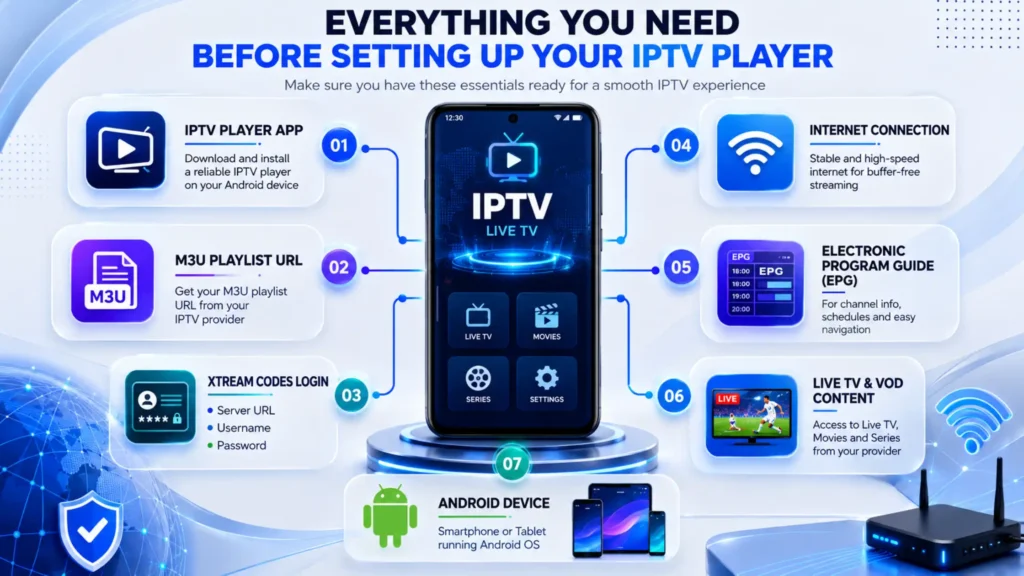
M3U Playlist URL
An internet link containing your live TV channels.
Example:
https://example.com/playlist.m3u
Xtream Codes Login
Many IPTV providers supply:
- Server URL
- Username
- Password
This method automatically imports:
- Live TV channels
- Movies
- TV series
- Electronic Program Guide (EPG)
It’s often the quickest and easiest way to configure an IPTV player.
Local Playlist File
Some providers supply an M3U file that you can download and import directly from your phone’s storage.
This option is useful if you don’t have an online playlist URL.
Installation Checklist
Before moving to the next step, make sure you’ve completed the following:
✅ Installed your preferred IPTV player.
✅ Updated the app to the latest version.
✅ Connected to a stable internet connection.
✅ Received your IPTV playlist or Xtream Codes credentials.
✅ Granted the necessary permissions.
Once these steps are complete, you’re ready to add your IPTV account and begin streaming.
In the next section, we’ll show you exactly how to add an M3U playlist, Xtream Codes login, or local playlist file so you can start watching live TV on your Android phone in just a few minutes.
How to Add an M3U Playlist or Xtream Codes to Your IPTV Player
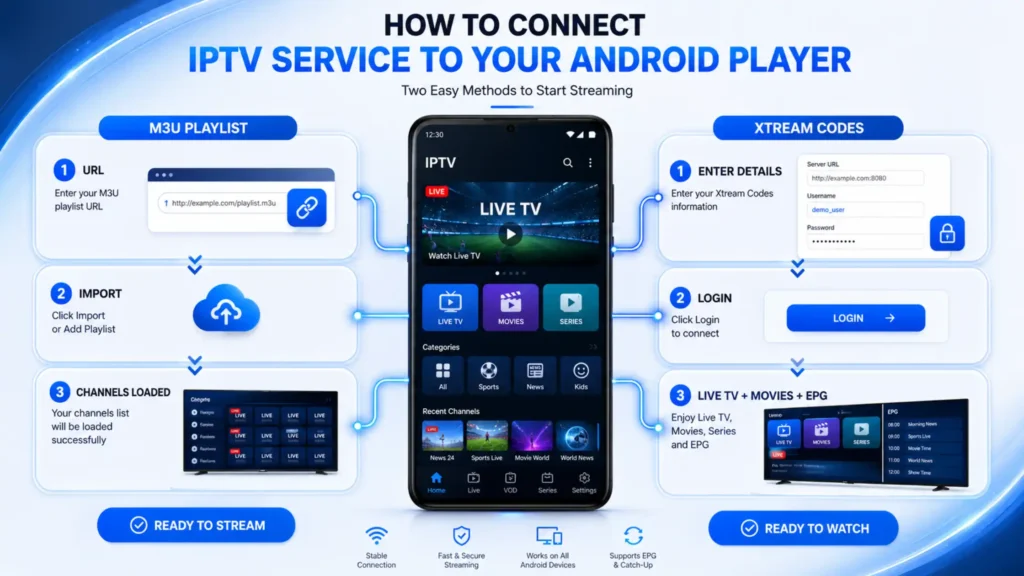
After installing your preferred IPTV player, the next step is connecting it to your IPTV service. Most Android IPTV players support one or more of the following methods:
- M3U Playlist URL
- Xtream Codes API
- Local M3U Playlist File
Although the interface varies slightly from one app to another, the overall setup process is very similar.
The M3U playlist is the most common format used by IPTV providers. It contains the links to your live TV channels and is supported by nearly every IPTV player.
Method 1: Add an M3U Playlist URL
Step 1: Open Your IPTV Player
Launch your chosen IPTV player on your Android phone.
On the welcome screen, look for an option such as:
- Add Playlist
- Add User
- Import Playlist
- New Playlist
Step 2: Select M3U Playlist
Choose the option to add an M3U Playlist URL.
Some applications also allow you to import a playlist file stored on your phone.
Step 3: Enter Your Playlist Details
You’ll usually be asked for:
- Playlist Name (optional)
- M3U URL
Example:
Playlist Name: My IPTV

Playlist URL:
https://example.com/playlist.m3u
After entering the information, tap Save or Import.
Step 4: Wait for Synchronization
The player will download:
- Live TV channels
- Categories
- Channel logos
- Electronic Program Guide (if available)
The process usually takes a few seconds, depending on the size of your playlist.
Method 2: Add Xtream Codes API
Many IPTV providers recommend using Xtream Codes because it automatically imports much more information than a standard M3U playlist.
Instead of copying a long playlist URL, you’ll simply enter your account details.
Step 1: Select Xtream Codes Login
Open your IPTV player and choose:
Login with Xtream Codes API
or
Xtream Codes
Step 2: Enter Your Credentials
Your IPTV provider will usually supply:
- Server URL
- Username
- Password
Example:
Server URL:
https://server-address.com

Username:
your_username

Password:
your_password
Tap Login or Add User.
Step 3: Automatic Import
The application will automatically load:
- Live TV
- Movies
- TV Series
- Categories
- Electronic Program Guide (EPG)
This method is generally faster and more convenient than importing an M3U playlist manually.
Method 3: Import a Local Playlist File
If your IPTV provider sends you a downloadable playlist file, you can import it directly from your Android device.
Steps
- Download the M3U file.
- Open your IPTV player.
- Choose Import Local Playlist.
- Browse to the file.
- Confirm the import.
Your channels will appear once the playlist has been processed.
Which Method Is Best?
Each setup option has its own advantages.
| Setup Method | Ease of Use | EPG Support | Automatic Updates | Recommended |
|---|---|---|---|---|
| Xtream Codes API | ⭐⭐⭐⭐⭐ | ✔ | ✔ | ⭐⭐⭐⭐⭐ |
| M3U Playlist URL | ⭐⭐⭐⭐☆ | ✔ (if provided) | Depends on the provider | ⭐⭐⭐⭐☆ |
| Local M3U File | ⭐⭐⭐☆☆ | Limited | ✖ | ⭐⭐⭐☆☆ |
For most users, Xtream Codes API is the easiest option because it automatically imports channels, Video on Demand, TV series, and the Electronic Program Guide without requiring additional configuration.
Common Setup Problems
Even if you’ve entered everything correctly, you may occasionally run into setup issues.
Playlist Won’t Load
Possible causes:
- Incorrect playlist URL
- Expired IPTV subscription
- Temporary server issue
- Internet connection problem
Check the information provided by your IPTV service and try again.
Login Failed
If you’re using Xtream Codes:
- Verify the server URL.
- Check your username.
- Confirm your password.
- Make sure there are no extra spaces before or after the credentials.
A small typing mistake is often enough to prevent the connection.
No TV Guide (EPG)
If channels load but the TV guide is empty:
- Refresh the EPG manually.
- Wait a few minutes for synchronization.
- Confirm that your IPTV provider includes EPG data.
Some services update program information periodically rather than instantly.
Channels Buffer Frequently
Buffering isn’t always caused by the IPTV player.
It may result from:
- Slow internet speeds
- Weak Wi-Fi signal
- High network traffic
- Temporary server congestion
Restarting your router, updating the app, and testing your internet connection are good first troubleshooting steps.
Tips for a Better IPTV Experience
To keep your IPTV player running smoothly:
- Use Xtream Codes when available for easier setup.
- Keep the app updated.
- Refresh playlists regularly.
- Update the Electronic Program Guide.
- Add frequently watched channels to your Favorites.
- Use a stable Wi-Fi or high-speed mobile connection.
- Restart the app occasionally to clear temporary processes.
Following these simple practices helps maintain a faster, more reliable streaming experience.
You’re Ready to Start Watching
Once your playlist has been imported successfully, your IPTV player will organize your content into categories such as:
- Live TV
- Movies
- TV Series
- Sports
- Kids
- News
- Favorites
From there, you can browse channels, search for content, and enjoy your IPTV service directly from your Android phone.
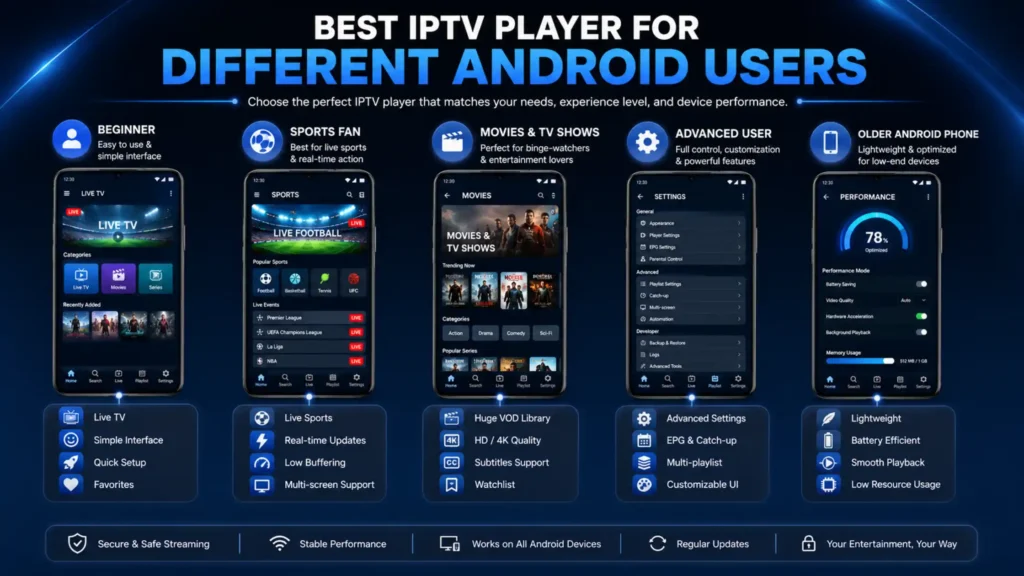
Best IPTV Player for Different Types of Android Users
After reviewing the top free IPTV players, one thing becomes clear: there isn’t a single “best” IPTV player for everyone. The ideal choice depends on how you use IPTV, the features you need, and the type of Android device you own.
Whether you’re a first-time user, a sports fan, or someone managing multiple IPTV subscriptions, there’s an app designed for your specific needs.
Here’s our expert recommendation for every type of Android user.
🏆 Best Overall IPTV Player
Winner: IPTV Smarters Pro
If you’re looking for one IPTV player that performs well in almost every situation, IPTV Smarters Pro is our top recommendation.
It combines:
- Simple setup
- M3U Playlist support
- Xtream Codes compatibility
- Electronic Program Guide (EPG)
- Movies and TV Series
- Clean interface
- Reliable performance
It’s an excellent choice for both beginners and experienced users.
Best for:
- Everyday streaming
- Families
- Live TV
- Movies
- Sports
- TV series
👶 Best IPTV Player for Beginners
Winner: Televizo
New to IPTV?
Televizo offers one of the easiest learning curves.
The interface is clean, playlists import quickly, and navigation is straightforward without unnecessary complexity.
Ideal for:
- First-time IPTV users
- Casual viewers
- Users who want a simple setup
- Android phone owners
⚽ Best IPTV Player for Sports Fans
Winner: XCIPTV Player
Sports fans often switch between multiple live events, making fast navigation essential.
XCIPTV stands out thanks to:
- Fast channel switching
- Stable live TV playback
- Reliable Xtream Codes support
- Responsive interface
If you regularly watch football, basketball, Formula 1, UFC, or other live competitions, XCIPTV is an excellent option.
🎬 Best IPTV Player for Movies and TV Shows
Winner: IPTV Smarters Pro
For users who spend more time watching Video on Demand than live TV, IPTV Smarters Pro provides excellent organization.
Its interface separates:
- Live TV
- Movies
- TV Series
- Recently Watched
- Favorites
This makes browsing large entertainment libraries much easier.
🔧 Best IPTV Player for Advanced Users
Winner: OTT Navigator IPTV
If you enjoy customizing your viewing experience, OTT Navigator offers more flexibility than almost any other IPTV player.
You can:
- Manage multiple playlists
- Create custom channel groups
- Hide unwanted channels
- Filter content by country or language
- Personalize the interface
It’s ideal for experienced IPTV users who like complete control.
📺 Best Television-Style Experience
Winner: TiviMate
TiviMate offers one of the most polished television interfaces available.
Its Electronic Program Guide closely resembles traditional cable TV, making channel browsing smooth and intuitive.
It’s particularly popular among users who watch live TV every day.
📱 Best IPTV Player for Older Android Phones
Winner: Perfect Player IPTV
If your Android phone has limited RAM or storage, Perfect Player remains one of the best lightweight options.
Benefits include:
- Low memory usage
- Fast startup
- Stable playback
- Efficient performance on older devices
It’s a practical choice for budget smartphones and aging hardware.
🎥 Best Lightweight Media Player
Winner: VLC Media Player
If all you need is a simple player for M3U playlists, VLC is hard to beat.
Its strengths include:
- Broad codec support
- Lightweight design
- Reliable playback
- No advertisements
- Support for local media files
While it lacks IPTV-specific features such as Xtream Codes and EPG, it’s an excellent choice for straightforward streaming.
🖥️ Best Open-Source IPTV Solution
Winner: Kodi
Kodi is ideal for users who want much more than an IPTV player.
It combines:
- IPTV playback
- Personal media libraries
- Music
- Movies
- TV series
- Add-on support
- Extensive customization
Although setup takes longer, Kodi offers exceptional flexibility for advanced users.
⭐ Best Balance of Features and Simplicity
Winner: NexTv IPTV
NexTv IPTV strikes a nice balance between modern design and ease of use.
It’s a good option for users who want:
- A clean interface
- Simple navigation
- Xtream Codes support
- M3U compatibility
- Reliable everyday performance
Without overwhelming users with advanced settings, it delivers a polished streaming experience.
Quick Recommendations
If you’re still unsure, here’s a quick summary.
| If You Want… | Recommended IPTV Player |
|---|---|
| 🏆 Best Overall | 🏆 IPTV Smarters Pro |
| 👶 Best for Beginners | 👶 Televizo |
| ⚽ Best for Sports | ⚽ XCIPTV Player |
| 🎬 Best for Movies & TV Shows | 🎬 IPTV Smarters Pro |
| 🔧 Best for Advanced Users | 🔧 OTT Navigator IPTV |
| 📺 Best TV Guide Experience | 📺 TiviMate |
| 📱 Best for Older Phones | 📱 Perfect Player IPTV |
| 🎥 Best Lightweight Option | 🎥 VLC Media Player |
| 🖥️ Best Open-Source Media Center | 🖥️ Kodi |
| ✨ Best Modern Interface | ✨ NexTv IPTV |
Our Final Recommendation
If you’re installing an IPTV player for the first time, IPTV Smarters Pro is the safest place to start. It offers an excellent mix of simplicity, compatibility, and features that will satisfy most Android users.
If you later decide you need more advanced customization, players like TiviMate or OTT Navigator IPTV provide additional flexibility without sacrificing performance.
Ultimately, the best IPTV player is the one that matches your viewing habits, works well with your IPTV service, and provides a smooth streaming experience on your Android device.
Watch Every Match Smoothly
Common IPTV Player Problems and How to Fix Them
Even the best IPTV player can occasionally experience issues. In most cases, the problem isn’t caused by the app itself—it may be related to your internet connection, IPTV service, playlist configuration, or device settings.
Below are the most common IPTV problems Android users encounter and the steps you can take to resolve them.
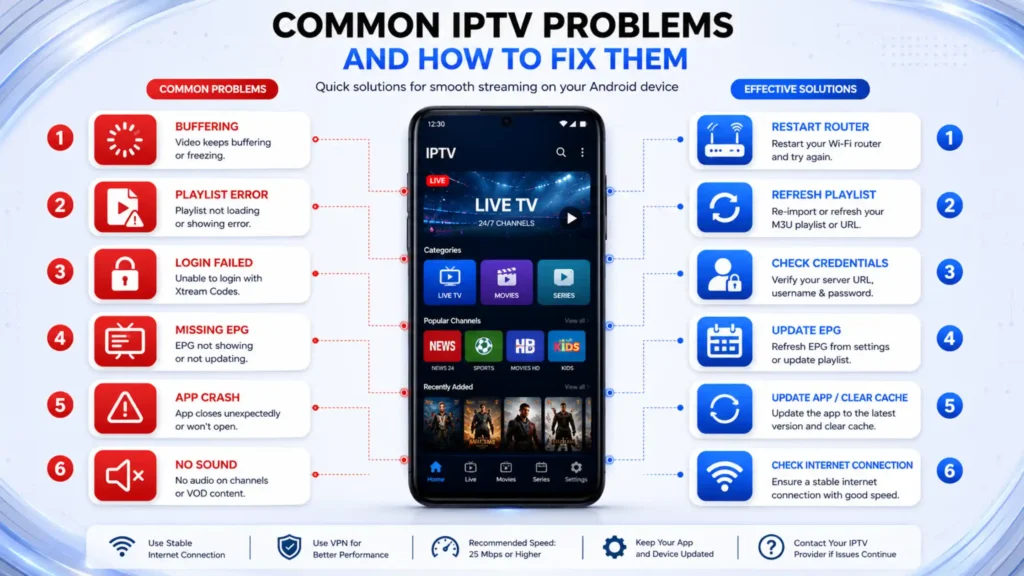
IPTV Playlist Won’t Load
If your playlist doesn’t import or no channels appear, the issue is usually related to your IPTV credentials.
Possible Causes
- Incorrect M3U URL
- Expired IPTV subscription
- Typing errors
- Internet connection problems
- Temporary server outage
How to Fix It
- Double-check your M3U playlist URL.
- Verify your Xtream Codes username and password.
- Confirm that your IPTV subscription is still active.
- Restart the IPTV player.
- Test your internet connection.
- Ask your IPTV provider if the server is experiencing maintenance.
Xtream Codes Login Failed
One of the most common setup problems is an unsuccessful Xtream Codes login.
Possible Causes
- Incorrect server URL
- Wrong username
- Wrong password
- Extra spaces copied during login
- Server temporarily unavailable
How to Fix It
- Carefully re-enter all credentials.
- Remove any spaces before or after the information.
- Check whether your provider has changed the server address.
- Try again after restarting the app.
Buffering During Live TV
Buffering is one of the most frustrating issues, especially when watching live sports or major events.
Possible Causes
- Slow internet connection
- Weak Wi-Fi signal
- Network congestion
- Temporary server overload
- Background downloads
- Outdated IPTV player
How to Fix It
- Restart your router.
- Connect to a 5 GHz Wi-Fi network if available.
- Pause downloads on other devices.
- Update your IPTV player.
- Restart your Android phone.
- Test your internet speed before streaming.
Electronic Program Guide (EPG) Isn’t Showing
If your channels appear but no program information is displayed, the TV guide may not have synchronized correctly.
Possible Causes
- Missing EPG URL
- Delayed synchronization
- IPTV provider doesn’t supply EPG data
- Cached information
How to Fix It
- Refresh the Electronic Program Guide manually.
- Wait a few minutes after importing your playlist.
- Confirm that your provider includes EPG support.
- Clear the app cache and restart the player if needed.
App Keeps Crashing
Unexpected crashes usually indicate either a software issue or limited device resources.
Possible Causes
- Outdated application
- Low available storage
- Corrupted cache
- Android compatibility issue
How to Fix It
- Update the IPTV player.
- Restart your Android phone.
- Clear the application’s cache.
- Free up storage space.
- Reinstall the app if the problem continues.
No Sound or No Video
Sometimes a stream loads successfully, but either the video or audio is missing.
Possible Causes
- Unsupported codec
- Temporary playback issue
- Hardware decoding conflict
How to Fix It
- Switch to an external player such as VLC or MX Player if your IPTV app supports it.
- Enable or disable hardware decoding in the app settings.
- Test another channel to determine whether the issue is stream-specific.
- Restart the player.
Channels Take Too Long to Load
Slow channel loading can make browsing frustrating.
Possible Causes
- Large playlist
- Slow internet
- Busy IPTV server
- Older Android device
How to Fix It
- Remove playlists you no longer use.
- Restart the app regularly.
- Use Xtream Codes when available for faster synchronization.
- Close background applications.
- Keep your IPTV player updated.
Favorites or Playlists Disappear
Occasionally, saved playlists or favorite channels may seem to disappear after an update or reinstall.
Possible Causes
- App data was cleared.
- Playlist synchronization failed.
- The app was reinstalled without restoring settings.
How to Fix It
- Re-import your playlist.
- Enable automatic playlist synchronization if available.
- Back up your settings if your IPTV player supports backups.
- Avoid clearing app data unless necessary.
Quick Troubleshooting Checklist
Before contacting your IPTV provider, go through this checklist:
| Problem | Recommended Solution |
|---|---|
| ❌ Playlist won’t load | Verify the M3U Playlist URL or your Xtream Codes API credentials. |
| 🔐 Login failed | Double-check the server URL, username, and password provided by your IPTV service. |
| 📡 Buffering | Restart your router, test your internet speed, or connect with Ethernet if possible. |
| 📺 Missing EPG | Refresh the TV Guide and make sure your provider includes a valid EPG source. |
| ⚠️ App crashes | Update the application to the latest version and clear its cache. |
| 🔇 No sound | Try another channel, switch the audio track, or test a different media player. |
| ⏳ Slow channel loading | Close background apps and refresh or reload your playlist. |
| ❤️ Missing favorites | Re-sync, refresh, or re-import your playlist from the IPTV provider. |
Tips to Prevent Future Problems
You can avoid many common IPTV issues by following a few simple best practices:
- Keep your IPTV player updated.
- Use the latest version of Android whenever possible.
- Maintain a stable internet connection.
- Refresh playlists regularly.
- Restart your phone occasionally.
- Avoid installing modified or unofficial versions of IPTV apps.
- Download applications only from trusted sources or the official developer.
Following these recommendations helps improve stability, reduce buffering, and ensure a smoother streaming experience.
With the right IPTV player, a reliable IPTV service, and a stable internet connection, most streaming problems can be resolved quickly without advanced troubleshooting.
Watch Every Match Smoothly
FAQs – Best Free IPTV Players for Android Phones
What is the best free IPTV player for Android phones?
For most users, IPTV Smarters Pro is the best free IPTV player because it offers an excellent balance of ease of use, playlist compatibility, and useful features. It supports M3U playlists, Xtream Codes, Electronic Program Guide (EPG), and Video on Demand, making it suitable for both beginners and experienced users.
Which IPTV player supports Xtream Codes?
Most modern IPTV players support Xtream Codes API, including:
- IPTV Smarters Pro
- TiviMate
- OTT Navigator IPTV
- Televizo
- XCIPTV Player
- Sparkle TV
- NexTv IPTV
Xtream Codes is often the easiest way to import channels, movies, TV series, and EPG information automatically.
Can I use an M3U playlist on Android?
Yes.
Nearly every IPTV player reviewed in this guide supports M3U playlists. Simply import your playlist URL or local M3U file, and the app will load your available channels.
What’s the difference between an IPTV player and an IPTV service?
An IPTV player is the software used to play IPTV content.
An IPTV service provides the live TV channels, movies, TV series, and playlist credentials.
Without an IPTV service or playlist, an IPTV player won’t display any channels.
Are IPTV players free?
Most IPTV players offer a free version with enough features for everyday use.
Some apps also provide optional premium upgrades that unlock additional customization, recording, cloud backups, or advanced playlist management.
Can I watch live sports using an IPTV player?
Yes.
An IPTV player can stream live sports if your IPTV provider includes sports channels in your subscription.
Apps such as XCIPTV Player, TiviMate, and IPTV Smarters Pro are especially popular among sports fans because of their smooth playback and fast channel switching.
Which IPTV player is easiest for beginners?
Televizo and IPTV Smarters Pro are among the easiest IPTV players to learn.
Both offer clean interfaces, simple setup processes, and support for the most common IPTV playlist formats.
Which IPTV player is best for Android TV?
If you primarily use an Android TV device, TiviMate and Sparkle TV provide some of the best television-style interfaces and are optimized for larger screens.
Can I use multiple IPTV playlists?
Yes.
Several IPTV players allow multiple playlists, including:
- IPTV Smarters Pro
- TiviMate
- OTT Navigator IPTV
- Sparkle TV
- Kodi
This feature is useful if you use more than one IPTV service.
Which IPTV player has the best Electronic Program Guide (EPG)?
TiviMate, IPTV Smarters Pro, and Sparkle TV offer some of the best EPG experiences, with organized schedules, channel logos, and intuitive navigation.
Do IPTV players include TV channels?
No.
An IPTV player doesn’t include channels by itself.
You’ll need an IPTV subscription or playlist from an IPTV provider before you can watch live TV.
Can I watch 4K IPTV on Android?
Yes.
Most modern IPTV players support HD, Full HD, and 4K playback.
To stream in 4K, you’ll also need:
- A compatible Android device
- A fast internet connection
- An IPTV provider that offers 4K content
Why does my IPTV keep buffering?
Buffering can occur for several reasons, including:
- Slow internet speeds
- Weak Wi-Fi
- Server congestion
- Outdated IPTV apps
- High network traffic
Keeping your IPTV player updated and using a stable internet connection can help reduce interruptions.
Which IPTV player is best for older Android phones?
If you’re using an older or budget Android phone, Perfect Player IPTV and VLC Media Player are good choices because they use relatively few system resources.
Can I use IPTV without Wi-Fi?
Yes.
You can stream IPTV over mobile data (4G or 5G), although live TV can consume a significant amount of data. For the best experience, a stable Wi-Fi connection is usually recommended, especially for HD and 4K streaming.
Is VLC a good IPTV player?
Yes, but with limitations.
VLC is excellent for playing M3U playlists and network streams, but it lacks IPTV-specific features such as Xtream Codes support, Electronic Program Guides, and advanced channel management.
Which IPTV player has the most customization?
OTT Navigator IPTV and TiviMate provide the highest level of customization.
Users can personalize channel groups, layouts, filters, favorites, and playlist organization.
Can I use one IPTV account on multiple Android devices?
That depends on your IPTV provider.
Some subscriptions allow multiple simultaneous connections, while others limit access to a single device. Always check your provider’s connection policy before logging in on additional devices.
How often should I update my IPTV player?
It’s a good idea to install updates whenever they become available.
Regular updates often include:
- Performance improvements
- Bug fixes
- Better Android compatibility
- Security enhancements
- New features
Which IPTV player should I choose?
For most Android users:
- Best Overall: IPTV Smarters Pro
- Best Premium Experience: TiviMate
- Best for Beginners: Televizo
- Best for Sports: XCIPTV Player
- Best for Advanced Users: OTT Navigator IPTV
- Best for Older Phones: Perfect Player IPTV
The right choice depends on your streaming habits, preferred features, and the IPTV service you use.
Conclusion
Choosing the best free IPTV player for your Android phone doesn’t have to be complicated. The right app depends on your device, viewing habits, and the features that matter most to you.
If you want the best all-around experience, IPTV Smarters Pro is our top recommendation thanks to its user-friendly interface, broad compatibility, and support for M3U playlists, Xtream Codes, Electronic Program Guide (EPG), and Video on Demand.
For users who want a premium television-style interface, TiviMate remains one of the strongest choices. If customization is your priority, OTT Navigator IPTV offers unmatched flexibility. Beginners will appreciate the simplicity of Televizo, while sports fans can benefit from the fast channel switching and smooth live TV performance of XCIPTV Player.
Throughout this guide, we’ve covered:
- The best free IPTV players for Android phones
- The advantages and disadvantages of each app
- Feature comparisons
- Installation methods
- How to add M3U playlists and Xtream Codes
- Common IPTV problems and solutions
- Expert recommendations for different types of users
No matter which IPTV player you choose, make sure it supports the playlist format provided by your IPTV service and keep the app updated to enjoy the best possible performance.
Looking for an IPTV Service That Works with These Android Players?
A great IPTV player is only part of the streaming experience. To enjoy reliable live TV, sports, movies, and TV series, you’ll also need a compatible IPTV service.
IPTV The Fox works with the most popular Android IPTV players featured in this guide, including:
- IPTV Smarters Pro
- TiviMate
- OTT Navigator IPTV
- XCIPTV Player
- Televizo
- Sparkle TV
- Perfect Player
- VLC Media Player
- Kodi
- NexTv IPTV
Using standard M3U playlists and Xtream Codes API, setup is quick and straightforward on most Android phones and tablets.
With extensive live TV coverage, thousands of entertainment channels, support for HD, Full HD, and 4K streaming where available, plus compatibility across a wide range of Android devices, it’s an excellent companion for your favorite IPTV player.
Whether you’re watching live sports, international channels, blockbuster movies, or binge-worthy TV series, pairing a reliable IPTV player with a dependable IPTV service helps deliver a smoother and more enjoyable streaming experience.
Final Recommendation
If you’re installing your first IPTV player today, start with IPTV Smarters Pro. It’s easy to configure, supports the most common IPTV formats, and offers an excellent balance of simplicity and features.
As your needs evolve, you can always explore more advanced options like TiviMate or OTT Navigator IPTV.
Whichever player you choose, keeping your app updated, using a stable internet connection, and selecting a reliable IPTV service will help you enjoy the best possible streaming experience on your Android phone.