The FIFA World Cup 2026 will be one of the biggest football events in history, and many fans are already searching for the easiest way to watch every match on their TV. If you use an Amazon FireStick, you are in a good position because FireStick supports many streaming apps that can show live football, highlights, replays, and tournament coverage.
So, can you watch the World Cup 2026 on FireStick for free? Yes, in many cases you can watch World Cup 2026 matches, highlights, and coverage on FireStick using free official apps, free broadcaster platforms, limited free trials, or region-based streaming services. The exact free option depends on your country, the official broadcasters in your region, and which apps are available on your Fire TV device.
This guide explains how to watch World Cup 2026 on FireStick free, which apps may work, how to install them, what internet speed you need, how to avoid buffering, and what to do if a stream is not available in your country.
By the end, you will know the best free World Cup streaming options for FireStick, how to set everything up step by step, and how to choose the most stable way to watch the tournament in HD or 4K.
Can You Watch World Cup 2026 on FireStick for Free?
Yes, you can watch the FIFA World Cup 2026 on FireStick for free in many regions, but availability depends on your country and the official broadcasting rights. Several broadcasters offer free live coverage through their official apps, while others provide free match highlights, analysis, or limited access during the tournament.
If you’re located in a country where a free-to-air broadcaster owns the World Cup rights, you can simply install its official FireStick-compatible app, sign in if required, and start watching live matches without paying for a cable subscription.
Here are some of the most popular free options available in different regions:
| Platform | Free Access | FireStick Compatible | Coverage |
|---|---|---|---|
| Tubi | ✅ Yes | ✅ Yes | Selected matches, highlights, and World Cup content (availability varies) |
| BBC iPlayer (UK) | ✅ Yes | ✅ Yes | Live matches, highlights, and full replays |
| ITVX (UK) | ✅ Yes | ✅ Yes | Live matches and tournament coverage |
| SBS On Demand (Australia) | ✅ Yes | ✅ Yes | Live World Cup matches and on-demand replays |
| Official FIFA Channels | ✅ Yes | ✅ Yes | Highlights, interviews, and match analysis |
| YouTube Sports Channels | ✅ Yes | ✅ Yes | Match highlights, goals, press conferences, and analysis |
Keep in mind that broadcasting rights differ from country to country. An app that streams every World Cup match for free in one region may not have the same rights elsewhere. In some cases, you’ll only have access to highlights or delayed replays rather than live games.
Another important factor is your FireStick model. Devices such as the Fire TV Stick 4K and Fire TV Stick 4K Max provide smoother HD and 4K playback, faster app performance, and better Wi-Fi connectivity than older FireStick models.
If you want the simplest experience, downloading the official broadcaster’s app from the Amazon Appstore is usually the safest and most reliable option. These apps receive regular updates, support high-definition streaming, and are optimized for Fire TV devices.
For football fans who don’t want to switch between multiple apps or worry about regional availability, many choose an all-in-one live TV solution that provides continuous access to sports channels throughout the tournament. This can offer a more convenient viewing experience, especially if you plan to watch every World Cup match from the group stage through the final.
What You Need Before Streaming the World Cup on FireStick
Before the first kick-off, it’s worth spending a few minutes preparing your FireStick. A properly configured device can make the difference between enjoying every goal in crystal-clear quality and dealing with buffering or app crashes during the biggest matches of the tournament.
Compatible FireStick Devices
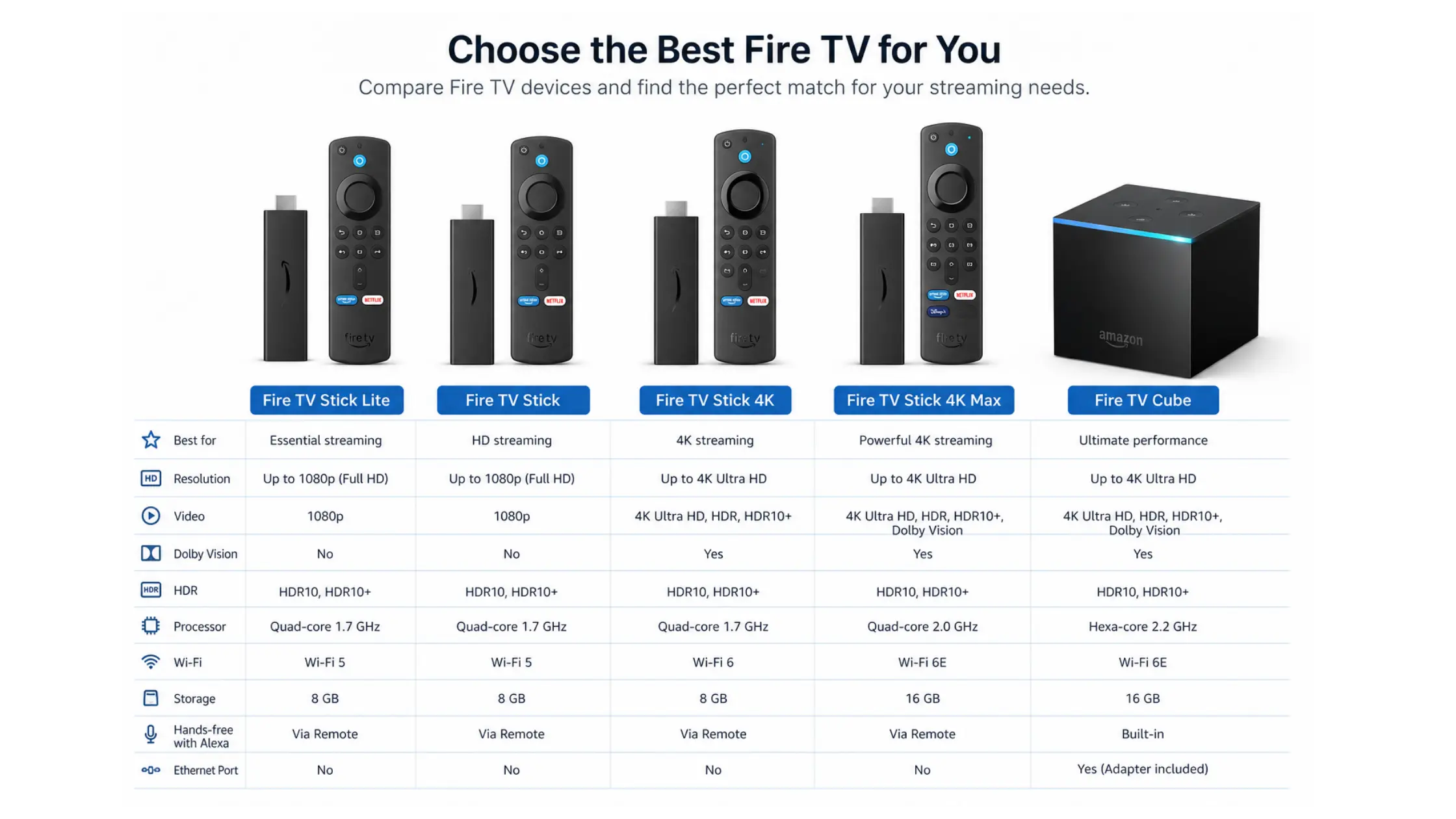
Almost every modern Amazon Fire TV device can stream World Cup 2026 matches, but newer models offer significantly better performance.
| Fire TV Device | HD Streaming | 4K Streaming | Recommended |
|---|---|---|---|
| Fire TV Stick Lite | ✅ | ❌ | Good for casual viewers |
| Fire TV Stick (3rd Gen) | ✅ | ❌ | Good |
| Fire TV Stick 4K | ✅ | ✅ | ⭐ Highly Recommended |
| Fire TV Stick 4K Max | ✅ | ✅ | ⭐ Best Choice |
| Fire TV Cube | ✅ | ✅ | Premium Performance |
If you’re planning to watch every match, especially in Ultra HD, the Fire TV Stick 4K Max or Fire TV Cube provides the fastest navigation, smoother playback, and improved Wi-Fi performance.
Use a Fast and Stable Internet Connection
Live football requires a reliable internet connection. Even the best streaming app can’t compensate for an unstable network.
For the best viewing experience, aim for these minimum download speeds:
| Streaming Quality | Recommended Speed |
|---|---|
| SD | 5 Mbps |
| HD (1080p) | 10–15 Mbps |
| Full HD | 20 Mbps |
| 4K Ultra HD | 25–35 Mbps |
Whenever possible:
- Connect to a 5 GHz Wi-Fi network.
- Place your router close to your FireStick.
- Limit heavy downloads while matches are being streamed.
- Restart your router occasionally to maintain optimal performance.
Keep Your FireStick Updated
Running the latest version of Fire OS improves compatibility with streaming apps and often fixes bugs that can cause playback issues.
To check for updates:
- Open Settings.
- Select My Fire TV.
- Choose About.
- Select Check for Updates.
- Install any available updates before the tournament begins.
Updating your device in advance helps ensure smoother streaming and better app stability.
Free Up Storage Space
Many streaming problems are caused by limited storage rather than slow internet.
Before installing World Cup streaming apps:
- Delete apps you no longer use.
- Clear the cache of frequently used streaming apps.
- Remove unnecessary downloads.
- Restart your FireStick after cleaning up storage.
Having at least 1 GB of free storage is recommended for optimal performance.
Create or Sign In to Your Amazon Account
You’ll need an Amazon account to download apps from the Amazon Appstore. Most official broadcasters make their apps available directly through the store, allowing you to install them safely without sideloading.
Some services may also require creating a free account before you can watch live matches or on-demand content.
Prepare Your Streaming Apps Before Match Day
Don’t wait until kickoff to install everything. Popular sporting events often lead to increased server traffic, longer download times, and sign-in delays.
Before the tournament starts:
- Install all the streaming apps you plan to use.
- Log in to each service.
- Verify that videos play correctly.
- Enable automatic app updates.
- Test your internet speed and Wi-Fi connection.
A few minutes of preparation can help you avoid missing the opening minutes—or even the entire match—because of last-minute technical issues.
Best Free Ways to Watch World Cup 2026 on FireStick
If you’re looking for free ways to watch the FIFA World Cup 2026 on your FireStick, there are several legitimate streaming options worth trying. The best choice depends on where you live, as broadcasting rights vary by country.
Below are some of the most popular services that may offer live matches, highlights, replays, or tournament coverage on Amazon Fire TV devices.
Tubi
Tubi is one of the easiest free streaming apps to install on FireStick. While it is primarily known for movies and TV shows, it may also provide World Cup-related content such as highlights, match analysis, documentaries, and selected live coverage depending on regional broadcasting agreements.
Pros
- Completely free
- Easy installation from the Amazon Appstore
- No cable subscription required
- HD streaming support
- User-friendly FireStick interface
Best for: Casual viewers who want highlights, analysis, and available live coverage.
BBC iPlayer (United Kingdom)
BBC iPlayer is one of the most popular options for football fans in the UK. When the BBC holds World Cup broadcasting rights, users can watch selected matches live in HD, along with full replays, expert analysis, and post-match coverage.
Features include:
- Live World Cup matches
- Match replays
- Highlights
- Expert commentary
- Multiple camera coverage (when available)
Best for: Viewers in the UK who want free, high-quality football coverage.
ITVX (United Kingdom)
ITVX typically shares World Cup broadcasting rights with the BBC, allowing viewers to watch additional live matches that are not shown on BBC channels.
Benefits include:
- Free live streaming
- Full match replays
- Tournament highlights
- Pre-match and post-match analysis
- Compatible with FireStick
For UK viewers, using both BBC iPlayer and ITVX provides access to nearly all tournament coverage.
SBS On Demand (Australia)
Australian football fans often rely on SBS On Demand for major international tournaments. The platform has historically offered free World Cup coverage, including live matches, highlights, and full replays.
Advantages include:
- Free registration
- HD streaming
- Match highlights
- On-demand replays
- Fire TV compatibility
FIFA Digital Platforms
FIFA’s official digital platforms are excellent sources for:
- Match highlights
- Goals
- Press conferences
- Player interviews
- Tactical analysis
- Tournament news
- Exclusive behind-the-scenes content
While live matches may not always be available, these platforms provide some of the most comprehensive World Cup coverage before and after each game.
YouTube Sports Channels
Many official broadcasters upload to YouTube:
- Match highlights
- Best goals
- Top saves
- Player interviews
- Daily tournament recaps
- Tactical breakdowns
YouTube works perfectly on FireStick and is one of the fastest ways to catch up if you miss a live game.
Which Free Option Is Best?
| Service | Live Matches | Highlights | Replays | FireStick Support | Cost |
|---|---|---|---|---|---|
| Tubi | Limited* | ✅ | Limited | ✅ | Free |
| BBC iPlayer | ✅ | ✅ | ✅ | ✅ | Free |
| ITVX | ✅ | ✅ | ✅ | ✅ | Free |
| SBS On Demand | ✅ | ✅ | ✅ | ✅ | Free |
| FIFA Digital Platforms | ❌ | ✅ | Selected | ✅ | Free |
| YouTube | ❌ | ✅ | Selected | ✅ | Free |
*Availability depends on regional broadcasting rights.
Looking for Every Match Without Switching Between Apps?
Free streaming services are a great way to watch World Cup content, but they often come with regional restrictions, limited match availability, or separate apps for different broadcasters. You may find yourself switching between multiple services just to follow your favorite team throughout the tournament.
If you prefer a simpler experience with consistent access to live sports channels, many football fans choose a premium live TV solution. Services like IPTV The Fox provide extensive sports coverage, HD and 4K streams, and access to international football channels in one place, making it easier to follow every stage of the World Cup without constantly searching for working streams.
How to Install World Cup Streaming Apps on FireStick
Installing official streaming apps on your Amazon FireStick only takes a few minutes. Most broadcasters offering World Cup coverage make their apps available directly through the Amazon App Store, so you don’t need any technical experience to get started.
Follow these steps before the tournament begins so you’re ready for kickoff.
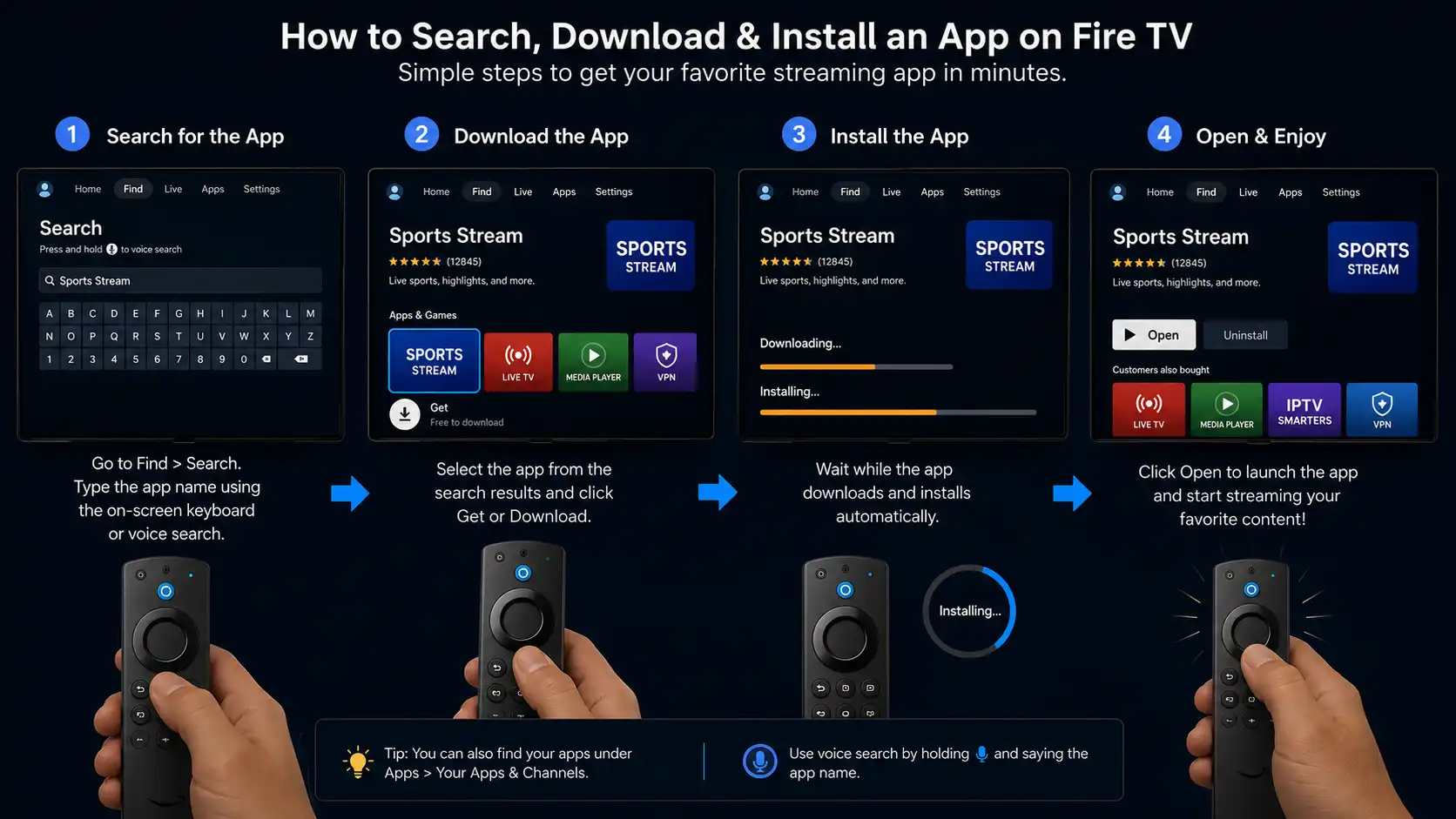
Step 1: Connect Your FireStick to the Internet
Before downloading any app, make sure your FireStick is connected to a stable Wi-Fi network.
To check your connection:
- Go to Settings.
- Select Network.
- Choose your Wi-Fi connection.
- Verify that the connection is active.
For the smoothest streaming experience, connect to a 5 GHz Wi-Fi network whenever possible.
Step 2: Open the Amazon Appstore
From the Fire TV home screen:
- Select the Find icon.
- Choose Search.
- Enter the name of the streaming app.
Examples include:
- Tubi
- BBC iPlayer
- ITVX
- SBS On Demand
- YouTube
Select the official app from the search results.
Step 3: Download and Install the App
After selecting the app:
- Click Get or Download.
- Wait for the installation to finish.
- Open the application.
Most apps install in less than two minutes, depending on your internet speed.
Step 4: Sign In or Create a Free Account
Some streaming services allow instant access, while others require a free account before you can watch live content.
If prompted:
- Create a free account.
- Verify your email address if required.
- Sign in using your credentials.
- Complete any activation steps shown on your TV.
This process only needs to be completed once.
Step 5: Find the World Cup Section
Once inside the app:
- Open the Sports category.
- Look for FIFA World Cup 2026.
- Browse live matches, schedules, highlights, or replays.
Many apps also display featured World Cup content directly on the home page during the tournament.
Keep Your Apps Updated
Streaming providers regularly release updates to improve performance and fix bugs.
To update an app:
- Open App Library.
- Highlight the app.
- Press the Menu button on your FireStick remote.
- Select More Info.
- Install any available update.
Running the latest version helps ensure compatibility throughout the tournament.
Organize Your Home Screen
If you plan to watch multiple matches each day, move your favorite streaming apps to the front of your FireStick home screen.
To do this:
- Highlight the app.
- Press the Menu button.
- Select Move.
- Place the app near the beginning of your app list.
This saves time when switching between broadcasters or checking match coverage.
Test Everything Before Match Day
Don’t wait until kickoff to see if everything works.
Before the World Cup starts:
- Open each streaming app.
- Confirm you can sign in successfully.
- Play a video to test playback quality.
- Check your internet speed.
- Restart your FireStick if needed.
- Enable automatic app updates.
Testing your setup in advance helps prevent last-minute issues during high-demand matches.
Quick Installation Checklist
| Task | Status |
|---|---|
| FireStick connected to Wi-Fi | ✅ |
| Latest Fire OS installed | ✅ |
| Streaming apps downloaded | ✅ |
| Accounts created and signed in | ✅ |
| Apps updated | ✅ |
| Video playback tested | ✅ |
| Home screen organized | ✅ |
Completing this checklist means your FireStick is ready for the FIFA World Cup 2026, allowing you to focus on the action instead of troubleshooting technical problems.
Best FireStick Settings for Smooth World Cup Streaming
Nothing is more frustrating than buffering during a penalty kick or losing connection just as your team scores. Fortunately, a few simple adjustments can significantly improve your FireStick’s performance and provide a smoother streaming experience throughout the FIFA World Cup 2026.
Whether you’re watching in HD or 4K, these optimization tips can help reduce interruptions and improve video quality.
Restart Your FireStick Regularly
Restarting your FireStick clears temporary processes and refreshes system resources.
To restart your device:
- Open Settings.
- Select My Fire TV.
- Choose Restart.
Restarting your FireStick before a big match can improve overall performance, especially if the device has been running for several days.
Clear the Cache of Streaming Apps
Streaming apps store temporary files over time. If too much cached data builds up, apps may become slower or less responsive.
To clear an app’s cache:
- Go to Settings.
- Select Applications.
- Choose Manage Installed Applications.
- Select the streaming app.
- Click Clear Cache.
This process does not delete your account or settings, but it can free up storage and improve app performance.
Keep at Least 1 GB of Free Storage
A nearly full FireStick may experience slower navigation, delayed app launches, and occasional freezing.
You can free up space by:
- Removing apps you no longer use.
- Deleting unnecessary downloads.
- Clearing cached files.
- Restarting the device after cleanup.
Checking available storage before the tournament begins helps avoid performance issues later.
Use a 5 GHz Wi-Fi Connection
Whenever possible, connect your FireStick to a 5 GHz Wi-Fi network instead of a 2.4 GHz network.
Benefits include:
- Faster download speeds
- Lower latency
- More stable HD and 4K streaming
- Less wireless interference
If your router supports both frequencies, choose the 5 GHz network when your FireStick is within good signal range.
Improve Your Wi-Fi Signal
The location of your router can have a noticeable impact on streaming quality.
For the best signal:
- Keep the router in an open area.
- Avoid placing it behind furniture or inside cabinets.
- Reduce the number of walls between the router and your FireStick.
- Move other wireless devices away if they cause interference.
If your television is far from the router, consider using a mesh Wi-Fi system or an Ethernet adapter designed for compatible Fire TV devices.
Update Fire OS and Streaming Apps
Software updates often include:
- Performance improvements
- Security patches
- Better compatibility with streaming services
- Bug fixes
Before the tournament begins:
- Check for Fire OS updates.
- Update every streaming app you plan to use.
- Enable automatic updates whenever available.
Keeping everything current reduces the chances of unexpected issues during live matches.
Close Unnecessary Background Apps
Although FireStick manages memory automatically, running multiple apps can consume system resources.
If your device feels slow:
- Exit apps you’re no longer using.
- Restart the FireStick occasionally.
- Avoid opening several streaming apps at the same time.
This helps maximize the available memory for live video playback.
Use an Ethernet Connection (Optional)
If Wi-Fi performance is inconsistent, a wired connection can provide greater stability.
An Ethernet adapter compatible with FireStick can help:
- Reduce buffering
- Maintain a consistent connection
- Improve streaming during peak internet usage
- Deliver more reliable 4K playback
This option is especially useful if many devices in your home are connected to the network simultaneously.
Quick Performance Checklist
Before every World Cup match, run through this simple checklist:
| Optimization Tip | Recommended |
|---|---|
| Restart FireStick | ✅ |
| Clear app cache | ✅ |
| Keep 1 GB or more of free storage | ✅ |
| Connect to 5 GHz Wi-Fi | ✅ |
| Update Fire OS | ✅ |
| Update streaming apps | ✅ |
| Test internet speed | ✅ |
| Close unused apps | ✅ |
Spending just a few minutes optimizing your FireStick before kickoff can greatly improve streaming reliability, helping you enjoy every match with fewer interruptions and better picture quality.
How to Fix Buffering While Watching the World Cup on FireStick
Buffering is one of the most common problems during major sporting events. Millions of fans stream the same match at the same time, which can overload streaming servers and expose weaknesses in your home network.
The good news is that most buffering issues can be resolved in just a few minutes.
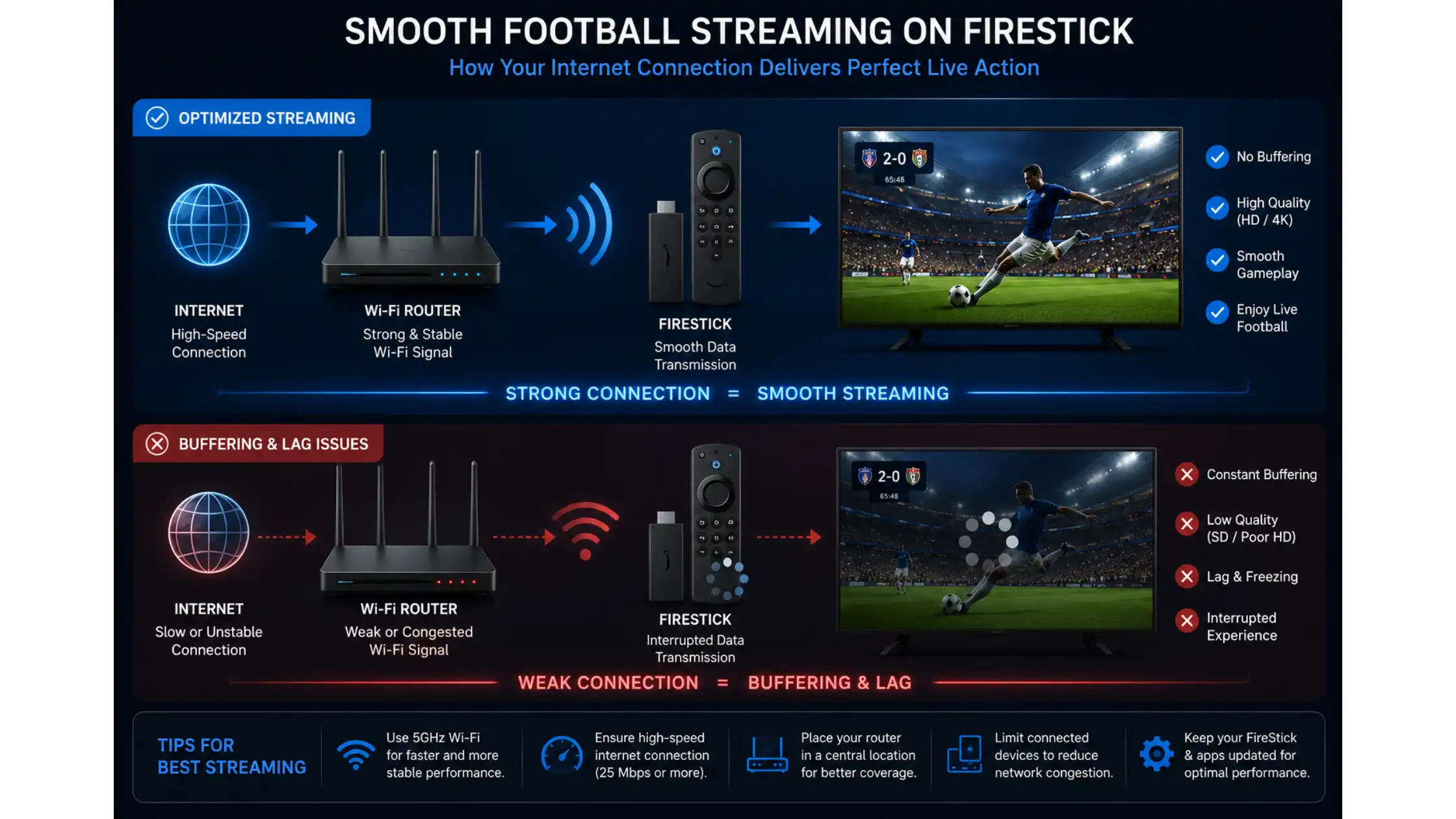
Check Your Internet Speed
Before changing any settings, test your internet connection.
For the best World Cup streaming experience, use these minimum speeds:
| Video Quality | Recommended Download Speed |
|---|---|
| SD | 5 Mbps |
| HD (720p–1080p) | 10–15 Mbps |
| Full HD | 20 Mbps |
| 4K Ultra HD | 25–35 Mbps |
If your speed is significantly lower, restart your modem and router or contact your internet provider.
Restart Your Router
A simple router restart often fixes temporary network issues.
Follow these steps:
- Turn off your router.
- Wait 30–60 seconds.
- Turn it back on.
- Allow the connection to stabilize before streaming again.
This refreshes your internet connection and may reduce buffering during live matches.
Move Closer to Your Wi-Fi Router
Weak Wi-Fi signals are a common cause of interruptions.
For better performance:
- Keep your FireStick within a reasonable distance of the router.
- Avoid placing large furniture or thick walls between the router and your TV.
- Use the 5 GHz Wi-Fi band if your router supports it.
If the signal remains weak, consider adding a Wi-Fi extender or mesh Wi-Fi system.
Reduce Network Traffic
If several devices are using your internet connection simultaneously, available bandwidth may be reduced.
During important matches, try to:
- Pause large downloads.
- Limit cloud backups.
- Avoid streaming multiple 4K videos on other devices.
- Disconnect devices that are not in use.
Giving your FireStick more available bandwidth often results in smoother playback.
Restart the Streaming App
Sometimes the issue is with the app rather than your internet connection.
Close the app completely, reopen it, and start the stream again.
If buffering continues:
- Clear the app cache.
- Update the app to the latest version.
- Reinstall the app if necessary.
Keep FireStick Cool
Streaming HD or 4K video for several hours can cause the device to become warm.
To prevent overheating:
- Ensure the FireStick has good airflow.
- Avoid placing it behind the television if heat builds up.
- Use the included HDMI extender if space is limited.
A cooler device generally performs more consistently during long viewing sessions.
Choose a Reliable Streaming Source
Not all streaming services perform equally during high-demand events.
Official broadcasters typically provide:
- More stable servers
- Better video quality
- Faster support
- Higher uptime during major tournaments
If one service is experiencing heavy traffic, another official broadcaster available in your region may offer a smoother experience.
Consider a Stable All-in-One Live TV Service
Free streaming platforms are excellent for occasional viewing, but they may experience server congestion, regional restrictions, or limited match availability during the busiest games.
If you plan to watch every match from the group stage through the final, many fans choose a reliable live TV service that offers dedicated sports channels, consistent HD or 4K streams, and access from a single interface. This can reduce the need to switch between multiple apps while following the tournament.
Common Buffering Problems and Solutions
| Problem | Possible Cause | Solution |
|---|---|---|
| Video keeps pausing | Slow internet | Test your connection and restart the router |
| Poor picture quality | Low bandwidth | Switch to a stronger Wi-Fi signal or reduce network usage |
| App freezes | Cached data or outdated app | Clear the cache and install updates |
| Stream won’t load | Server congestion | Try again later or use another official streaming app |
| Audio out of sync | Temporary playback issue | Restart the app or reboot the FireStick |
| Frequent disconnects | Weak Wi-Fi signal | Move closer to the router or use Ethernet if supported |
Quick Troubleshooting Checklist
If your World Cup stream starts buffering, follow this order:
- Test your internet speed.
- Restart the streaming app.
- Restart your FireStick.
- Restart your router.
- Clear the app cache.
- Update Fire OS and streaming apps.
- Switch to a different official streaming service if available.
- Check whether the issue is affecting other viewers, which may indicate temporary server overload.
Most streaming problems can be resolved with these simple steps, allowing you to get back to the match without missing too much of the action.
Free vs Paid World Cup Streaming on FireStick
Choosing between free and paid streaming depends on how you plan to watch the FIFA World Cup 2026. If you only want to catch a few matches or watch highlights, free services may be enough. However, if you don’t want to miss a single game, a paid live TV service often provides a more consistent experience.
Here’s a side-by-side comparison to help you decide.
Free vs Paid Streaming Comparison
| Feature | Free Streaming Services | Paid Live TV Services |
|---|---|---|
| Cost | ✅ Free | 💲 Monthly or annual subscription |
| Live World Cup Matches | Limited (depends on your country and broadcasting rights) | Usually broader coverage, depending on the provider and package |
| HD Streaming | ✅ Available | ✅ Available |
| 4K Streaming | Available on some services | Often available, depending on the service and channel |
| Match Replays | Limited | Frequently included |
| Multiple Sports Channels | Limited | Usually extensive |
| Regional Restrictions | Common | May still apply depending on licensing and location |
| Number of Apps Needed | Often multiple | Typically one main app or platform |
| Reliability During Peak Matches | Can vary due to demand | Often more consistent, though performance depends on the provider |
| Customer Support | Limited | Usually available |
When Free Streaming Is the Right Choice
Free platforms are a great option if you:
- Watch only a few World Cup matches.
- Mainly want highlights and post-match analysis.
- Have access to a free official broadcaster in your country.
- Don’t mind switching between different streaming apps.
- Prefer not to pay for a subscription.
For many casual football fans, official free streaming services provide more than enough coverage throughout the tournament.
When a Paid Service Makes More Sense
A paid streaming solution may be worth considering if you:
- Plan to watch every World Cup match.
- Follow multiple national teams.
- Want access to additional football leagues and tournaments after the World Cup.
- Prefer having live TV channels in one place instead of using several different apps.
- Value a consistent viewing experience with fewer interruptions.
While no service can guarantee perfect performance at all times, established paid providers often invest in infrastructure and customer support to improve reliability during major sporting events.
Which Option Is Best for Most Football Fans?
There isn’t a single answer that fits everyone.
If your goal is simply to watch a handful of matches, free official streaming services are an excellent place to start.
If you’re planning to follow the tournament from the opening match through the final—and continue watching leagues like the Premier League, UEFA Champions League, La Liga, Serie A, Bundesliga, or international competitions afterward—a comprehensive live TV service can offer greater convenience by bringing many sports channels together in one place.
A Convenient Alternative for Watching Every Match
Many football fans start with free streaming apps but eventually switch between several services because different broadcasters own the rights in different regions.
If you prefer having live sports channels together in a single platform, IPTV The Fox is one option to consider. It offers access to a wide selection of sports channels, HD and 4K streaming support where available, and coverage of major football competitions, making it easier to follow the World Cup and other tournaments without constantly searching for different streaming apps.
No matter which option you choose, it’s a good idea to test your setup before match day so you’re ready when the action begins.
Can You Watch the World Cup 2026 on FireStick in 4K?
Yes, you can watch selected FIFA World Cup 2026 matches in 4K on FireStick, provided that your streaming service, Fire TV device, television, and internet connection all support Ultra HD streaming.
Not every broadcaster offers every match in 4K, so the available picture quality depends on the service you use and your location.
What Do You Need for 4K Streaming?
To enjoy the best possible viewing experience, you’ll need the following:
| Requirement | Recommended |
|---|---|
| Fire TV Device | Fire TV Stick 4K, Fire TV Stick 4K Max, or Fire TV Cube |
| Television | 4K Ultra HD TV with HDMI support |
| Internet Speed | At least 25 Mbps (35 Mbps recommended) |
| Streaming Service | A provider that offers 4K World Cup coverage where available |
| Wi-Fi | 5 GHz or a wired Ethernet connection |
If one of these requirements isn’t met, the stream will usually fall back to HD instead of Ultra HD.
Which FireStick Models Support 4K?
Not every Fire TV device supports Ultra HD playback.
| Fire TV Device | 4K Support | HDR Support | Recommended for the World Cup |
|---|---|---|---|
| Fire TV Stick Lite | ❌ | ❌ | No |
| Fire TV Stick (3rd Gen) | ❌ | ❌ | HD Only |
| Fire TV Stick 4K | ✅ | ✅ | ⭐ Yes |
| Fire TV Stick 4K Max | ✅ | ✅ | ⭐⭐⭐ Best Choice |
| Fire TV Cube | ✅ | ✅ | ⭐ Excellent |
If you’re planning to watch multiple matches throughout the tournament, the Fire TV Stick 4K Max offers the best balance of speed, performance, and picture quality.
Tips for the Best 4K Streaming Experience
To get the sharpest image with minimal interruptions:
- Use a stable internet connection with at least 25–35 Mbps.
- Connect to a 5 GHz Wi-Fi network whenever possible.
- Keep your FireStick updated with the latest Fire OS version.
- Close unused apps before streaming.
- Restart your FireStick before important matches.
- Ensure your TV’s HDMI input supports 4K and HDR.
These simple steps can help maintain smooth playback during high-profile matches.
Why 4K Makes a Difference
Football is one of the best sports to watch in Ultra HD because of the fast-paced action and large playing field.
With 4K streaming, you can enjoy:
- Sharper player details.
- Better ball visibility during long passes.
- More vibrant stadium colors.
- Improved HDR contrast on compatible TVs.
- A more immersive viewing experience, especially on larger screens.
If your setup supports it, 4K can make the World Cup feel even closer to being in the stadium.
Can You Watch Every Match in 4K?
Not necessarily.
Whether a match is available in 4K depends on:
- The official broadcaster in your country.
- The rights they have acquired.
- The streaming platform you’re using.
- Your subscription or account level, if applicable.
Some broadcasters may offer only selected matches—such as the opening game, semifinals, or final—in Ultra HD, while others may provide broader 4K coverage.
Before the tournament begins, check the streaming service you plan to use to see which matches will be available in 4K.
4K Streaming Checklist
Before kickoff, make sure you have:
- ✅ A Fire TV Stick 4K, Fire TV Stick 4K Max, or Fire TV Cube
- ✅ A 4K-compatible television
- ✅ A fast and stable internet connection
- ✅ The latest version of your streaming app
- ✅ A streaming service that supports 4K broadcasts where available
With the right hardware and a reliable streaming service, you’ll be ready to enjoy the FIFA World Cup 2026 in the highest quality your setup can support.
Best FireStick Apps for Football Fans
Your FireStick can become the ultimate football streaming device when you install the right apps. Whether you want to watch live World Cup matches, catch up on highlights, follow transfer news, or enjoy football documentaries, there are plenty of excellent options available.
Below are some of the best FireStick apps for football fans before, during, and after the FIFA World Cup 2026.
Top FireStick Apps for Watching Football
| App | Live Matches | Highlights | Replays | Free | FireStick Compatible |
|---|---|---|---|---|---|
| Tubi | Limited | ✅ | Limited | ✅ | ✅ |
| BBC iPlayer | ✅ | ✅ | ✅ | ✅ | ✅ |
| ITVX | ✅ | ✅ | ✅ | ✅ | ✅ |
| SBS On Demand | ✅ | ✅ | ✅ | ✅ | ✅ |
| YouTube | ❌ | ✅ | Selected | ✅ | ✅ |
| Official Broadcaster Apps | Depends on region | ✅ | Often | Varies | ✅ |
| IPTV The Fox | Extensive live sports channels | ✅ | Depends on channel | Subscription | ✅ |
Tubi
Tubi is a great free app for football fans looking for sports-related content, tournament coverage, documentaries, and highlights. Availability of live World Cup content depends on regional broadcasting agreements, but it’s still worth installing because it’s free and easy to use.
Best for:
- Match highlights
- Football documentaries
- Sports programming
- Free entertainment
BBC iPlayer
If you’re in the United Kingdom, BBC iPlayer is one of the best ways to watch World Cup coverage on FireStick.
You’ll typically find:
- Live matches
- Expert analysis
- Match replays
- Tournament highlights
- Studio coverage
ITVX
ITVX complements BBC coverage by broadcasting additional World Cup matches.
Football fans can enjoy:
- Live games
- Highlights
- Match analysis
- Football documentaries
- Tournament news
Installing both BBC iPlayer and ITVX gives UK viewers excellent tournament coverage.
SBS On Demand
Australian viewers can often rely on SBS On Demand for major football tournaments.
Features include:
- Live World Cup matches
- HD streaming
- Match replays
- Highlights
- Football news
YouTube
YouTube remains one of the best free football apps available on FireStick.
Official channels regularly upload:
- Match highlights
- Top goals
- Best saves
- Press conferences
- Tactical analysis
- Player interviews
- Daily World Cup recaps
It’s also ideal if you miss a match and want to catch the key moments in just a few minutes.
Official Sports Apps
Depending on your location, you may also have access to official broadcaster apps that carry World Cup coverage.
These apps often include:
- Live scores
- Match schedules
- Team news
- Player statistics
- Tournament highlights
- Breaking football news
Checking your local broadcaster’s Fire TV app before the tournament begins is a good way to ensure you don’t miss any action.
Which App Is Best?
The best app depends on your viewing preferences.
| If You Want To… | Recommended App |
|---|---|
| Watch free highlights | YouTube |
| Watch free matches (where available) | BBC iPlayer, ITVX, SBS On Demand |
| Stay updated with football news | Official broadcaster apps |
| Watch documentaries | Tubi |
| Access many live sports channels in one place | IPTV The Fox |
Recommended App Combination
Many experienced football fans install several apps instead of relying on just one.
A practical setup includes:
- One official broadcaster app for live matches.
- YouTube for instant highlights and post-match analysis.
- Tubi for additional football content and documentaries.
- A comprehensive live TV service if you want convenient access to sports channels throughout the tournament.
By preparing your FireStick with multiple apps before the FIFA World Cup 2026 begins, you’ll have several viewing options available if one service experiences heavy traffic or limited coverage.
Frequently Asked Questions
Can I watch the FIFA World Cup 2026 on FireStick without cable?
Yes. You don’t need a traditional cable subscription to watch the World Cup on FireStick. Many official broadcasters offer streaming through their apps, and some provide free access depending on your country. There are also subscription-based live TV services that support FireStick and offer sports coverage.
Is it free to watch the World Cup on FireStick?
It can be. Several official broadcasters provide free World Cup coverage in specific countries, while others require a subscription. Free availability depends on the broadcasting rights where you live.
Which FireStick is best for watching football?
The Fire TV Stick 4K Max is the best option for most football fans thanks to its fast performance, Wi-Fi 6 support (with a compatible router), and excellent 4K streaming capabilities. The Fire TV Cube is another premium choice for users who want the highest level of performance.
Can I watch the World Cup in 4K on FireStick?
Yes, if your FireStick model, television, internet connection, and streaming service all support 4K. Not every broadcaster will stream every match in Ultra HD, so availability varies by region.
What internet speed do I need for smooth streaming?
For the best experience, use:
5 Mbps for SD
10–15 Mbps for HD
20 Mbps for Full HD
25–35 Mbps for 4K Ultra HD
A stable connection is just as important as raw download speed.
Why does my FireStick keep buffering during football matches?
Slow internet speeds
Weak Wi-Fi signals
High network traffic
Outdated streaming apps
Full device storage
Heavy demand on streaming servers during major matches
Do I need to install apps from outside the Amazon Appstore?
For most viewers, no. Many official streaming services are available directly through the Amazon Appstore. Downloading apps from trusted sources helps keep your FireStick secure and ensures you receive regular updates.
Can I watch match highlights after the games end?
This depends on the streaming provider. Some services allow multiple simultaneous streams, while others limit the number of devices that can watch at the same time. Check your provider’s terms for specific details.
Can I watch other football competitions on FireStick?
Absolutely. FireStick supports apps that stream many major football competitions throughout the year, including:
Premier League
UEFA Champions League
UEFA Europa League
La Liga
Bundesliga
Serie A
Ligue 1
International friendlies
Continental tournaments
The competitions available will depend on the streaming service and broadcasting rights in your region.
What’s the easiest way to watch every World Cup match?
If you don’t want to switch between multiple apps or keep track of different broadcasters, many viewers prefer a live TV service that brings sports channels together in one place. This can make it easier to follow every stage of the tournament, from the opening match to the final, while also providing access to other football competitions throughout the year.
Conclusion
Watching the FIFA World Cup 2026 on FireStick has never been easier. Whether you choose a free official broadcaster, a streaming app available in your region, or a premium live TV service, your FireStick provides a simple and convenient way to enjoy every moment of the tournament from your living room.
Throughout this guide, you’ve learned:
- How to watch World Cup 2026 on FireStick for free
- The best free streaming apps available
- How to install streaming apps on FireStick
- Tips to improve streaming quality and reduce buffering
- How to stream selected matches in HD and 4K
- Which FireStick models deliver the best performance
- The differences between free and paid streaming options
The best solution depends on your location, your preferred viewing experience, and whether you plan to watch only a few matches or follow the entire tournament.
If you’re using free services, install your apps before the tournament begins, test your internet connection, and keep your FireStick updated to avoid missing any of the action.
Looking for a More Reliable Way to Watch Every World Cup Match?
Free streaming options are great, but they may come with regional restrictions, limited match availability, or the need to switch between several different apps.
If you’d rather enjoy the tournament from one platform, IPTV The Fox offers a convenient alternative for football fans. With access to thousands of live TV channels, extensive sports coverage, HD and 4K streaming support where available, and compatibility with Amazon FireStick, it’s an easy way to follow every stage of the FIFA World Cup 2026 and many other major sporting events throughout the year. Want to try before you commit? Check out these IPTV free trial options.
Whether you’re cheering for your national team, following every knockout match, or watching the final with family and friends, preparing your FireStick before kickoff will help ensure a smooth and enjoyable streaming experience.
Enjoy the FIFA World Cup 2026 and may the best team lift the trophy!